

I’ve mastered the error messages in Microsoft Dynamics NAV!
Dynamics NAV error messages: There are several common errors that can occur during the journal posting process, and they are usually very easy to fix. The content of the following article explains how to resolve three of the most frequent ones.

In the process of posting transactions in the journal, if we are entering an accounting entry that is not intended to generate IGIC/VAT entries or additional sales or purchase movements, such as:
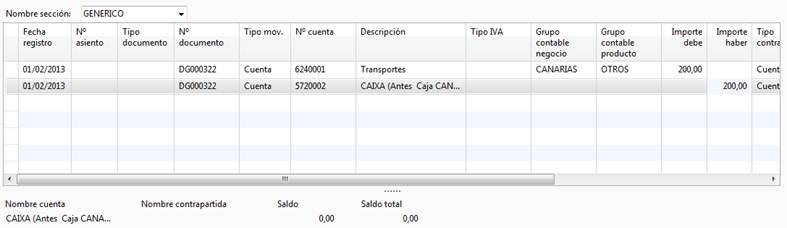
Entering Accounting Movements in Microsoft Dynamics NAV
We can see that the columns “Business Posting Group” and “Product Posting Group” have assigned values, and the columns “VAT Bus. Posting Group” and “VAT Prod. Posting Group” likely contain information as well.
When posting this entry, one of the following messages may appear:
- “VAT Type must not be in Gen. Journal Line: Journal Template Name=GENERAL, Journal Batch Name=CAJA, Line No.=10000”
Cause:
Line number 10000 (the first line) has a value assigned in the Business Posting Group and Product Posting Group columns, or in VAT Bus. Posting Group and VAT Prod. Posting Group, but the VAT Type field is blank.
Microsoft Dynamics NAV interprets this as an attempt to post a sales or purchase transaction, and these types of transactions require specifying whether the VAT Type is Sales or Purchase.
- “The VAT Posting Setup does not exist. Identifying fields and values: VAT Bus. Posting Group=‘’, VAT Prod. Posting Group=‘’”
Cause:
This case is similar to the previous one. Dynamics NAV interprets that you are trying to post a sales or purchase transaction because at least one line has a value in the VAT Type field, but the Business Posting Group and Product Posting Group, or the VAT Bus. Posting Group and VAT Prod. Posting Group, are blank.
In this situation, NAV assumes that additional sales or purchase entries should be created, and therefore requires the corresponding posting groups and VAT posting setup.
- Verify that all entries with the same Document No. and a VAT Bus. Posting Group and VAT Prod. Posting Group have a Customer/Vendor associated. Verify that all lines with the same Document No. do not have more than one Customer/Vendor assigned. Verify that all lines with the same Document No. have the same value in the Document Type field: Invoice, Credit Memo, or Finance Charge Memo.
Cause:
Dynamics NAV interprets that you are trying to post an invoice or credit memo, so it requires a customer or vendor to be associated with the document.
This error appears when at least one line has a value in the VAT Type, Product Posting Group, and Business Posting Group fields, or in the VAT Bus. Posting Group and VAT Prod. Posting Group fields.
Solution to Dynamics NAV Error Messages
If you do not want to generate IGIC/VAT entries or any sales and/or purchase movements, leave the following fields blank:
- VAT Type
- Business Posting Group
- Product Posting Group
- VAT Bus. Posting Group
- VAT Prod. Posting Group
At ABD, we are specialists in Microsoft Dynamics Nav and Dynamics 365 Business Central.

If you have any questions, feel free to contact us. We’re here to help you.