

Microsoft has consistently demonstrated its strong commitment to productivity tools. One of its most successful offerings is the Office suite, which enables us to create and view documents, presentations, invoices, spreadsheets, databases, and much more.
Today, Microsoft announced Microsoft Planner, a new tool that will be rolled out over the coming weeks. Microsoft Planner will be available for Office 365 Enterprise E1–E5, Business, Essentials, Premium, and Education plans.
Microsoft Planner for Office 365 will enable organizations, schools, and businesses to organize their work in a completely new and productive way. Teams will be able to create projects, assign tasks, stay organized, collaborate by sharing progress updates, and share files. They will also have access to a comprehensive visual dashboard from which they can manage email notifications, ensuring that all team members stay informed about progress at all times.

No action will be required from administrators or users to obtain this tool. The tool will automatically appear in the Office 365 menu for all users over the coming weeks as it becomes available.
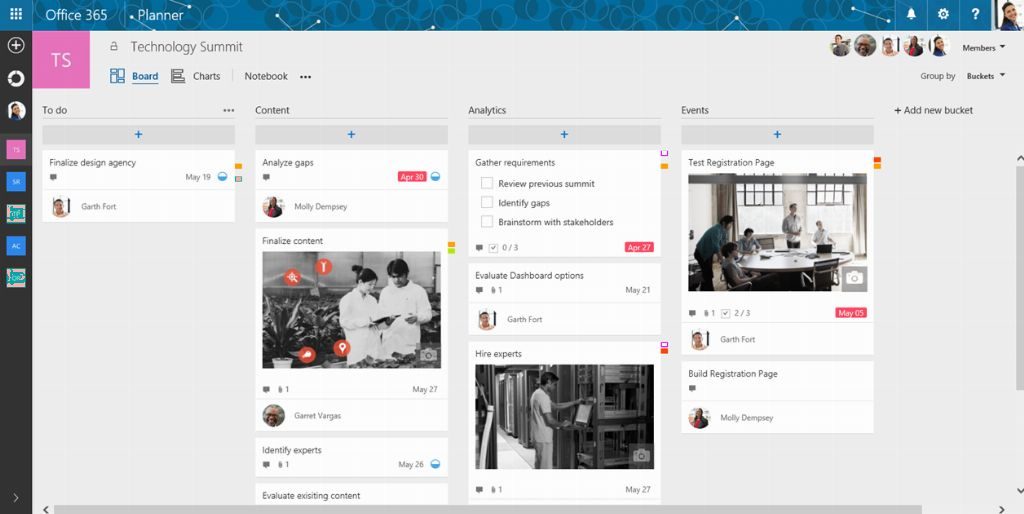
Since the launch of the Microsoft Planner preview, Microsoft has been working with various Office 365 customers around the world. Many of them have already experienced the benefits that this new productivity tool brings, making teamwork even easier within Office 365. One example is the Municipality of Cascais, where more than 1,000 employees use Office 365 daily to organize all their collaborative work tasks.
Microsoft will be introducing new features for Microsoft Planner over the coming months. These enhancements include task assignment to multiple users, customizable boards, external user access, plan templates, and applications for Windows, iOS, and Android.
As always, Microsoft remains open to hearing new ideas and reports of potential issues through UserVoice, where you can submit all the feedback needed to further improve Microsoft Planner. Here is a link to the Office 365 demo version along with this tool so you can share your thoughts with us.