

Is Office 365 freezing or running slowly? Many times, Office 365 tools and applications may experience performance issues, become unresponsive, or slow down the use of the PC.
This may be due to conflicts between installed programs, issues with the antivirus, or configuration errors in the organization’s or the computer’s network environment.
Identifying the source of errors in Office 365
At times, determining the origin of an issue can be a challenging task for administrators or the IT department.
To make this task easier, Microsoft has developed a support tool capable of analyzing errors in Office 365, reviewing installed applications, and proposing automatic or manual solutions.
Microsoft Support and Recovery Assistant: the key tool
The tool is called Microsoft Support and Recovery Assistant (SaRA), also known as the Microsoft 365 Recovery Assistant, and it is designed to quickly and safely troubleshoot issues in Office 365.
You can download it directly from Microsoft’s official website.
Once installed, you just need to run it and follow the steps in the wizard, which will guide you through the entire diagnostic process.
Step 1: Select the source of the problem
When you start the assistant, you will be able to choose the affected Office 365 application (Word, Excel, Outlook, Teams, OneDrive, etc.) and the type of error detected.
The system will display a list of common issues, such as Office 365 freezes, synchronization errors, or slow application performance.
Microsoft periodically updates the tool by adding new issues, which makes error detection and repair increasingly effective.
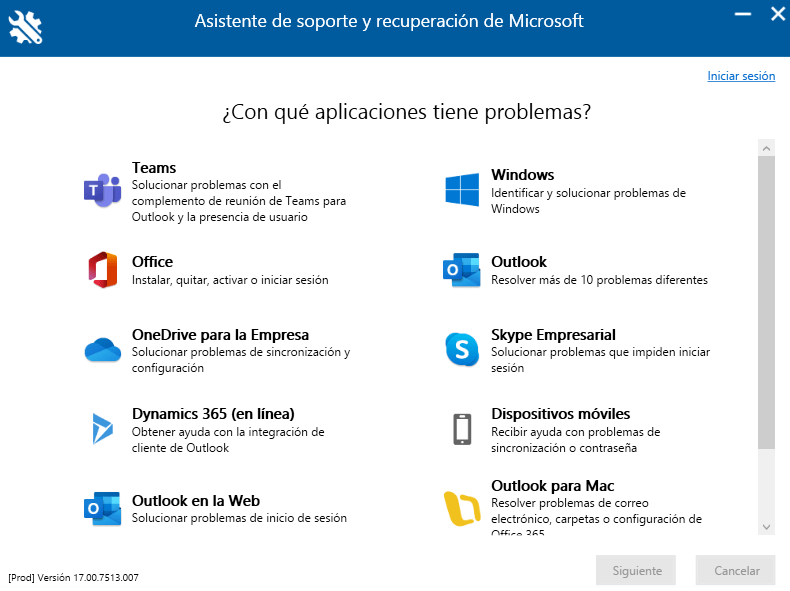
Step 2: System analysis and diagnosis
Depending on the type of issue selected, the tool automatically analyzes your computer and network environment, checking configurations, versions, active services, and user permissions.
During the process, it may ask you to sign in to your Microsoft 365 account to continue the diagnosis.
Once completed, it offers an automatic solution or detailed instructions to resolve the issue. In some cases, the tool itself can apply the fix directly.

Step 3: Confirm the resolution
After completing the process, the application will ask you to confirm whether the issue has been resolved.
If not, Microsoft Support and Recovery Assistant can restart the analysis or recommend that you open a technical support case with Microsoft for a more advanced review.

Advantages of using Microsoft Support and Recovery Assistant
Using this tool offers multiple benefits for both administrators and users:
- Fast detection of errors in Office 365 applications.
- Automatic analysis of the network environment and configuration.
- Guided resolution of common issues, step by step.
- Performance optimization for Word, Excel, Outlook, or Teams.
- Integration with Microsoft technical support in case of persistent issues.
In short, having this tool can save you time and improve the efficiency of the Microsoft 365 environment, reducing interruptions in daily work.
Office 365 support and maintenance with ABD Consulting
At ABD Consultoría y Soluciones Informáticas, we are official Microsoft partners and experts in the administration, support, and optimization of Microsoft 365 environments.
We help companies resolve technical issues, configure their cloud-based work environment, and ensure stable and secure performance across all Office 365 applications.
If you need advice or advanced support, contact us and we will show you our Premium support solutions for Microsoft 365, designed for companies seeking efficiency and peace of mind.