

If the configuration options available within SharePoint Online sites in Microsoft 365 weren’t enough, it’s worth noting that there are additional places where you can configure your sites and apply settings you may not have seen before. Beyond the options offered directly within each site (by clicking the gear icon in the upper‑right corner), there are other areas where you can shape and customize your SharePoint sites.
To begin, you need to access the SharePoint Admin Center. Once there, you’ll find two main areas where you can configure everything related to SharePoint.
On one hand, you have the Settings section. This area is designed to configure various basic SharePoint features that help define how your sites are created and maintained. To access it, simply click Settings:

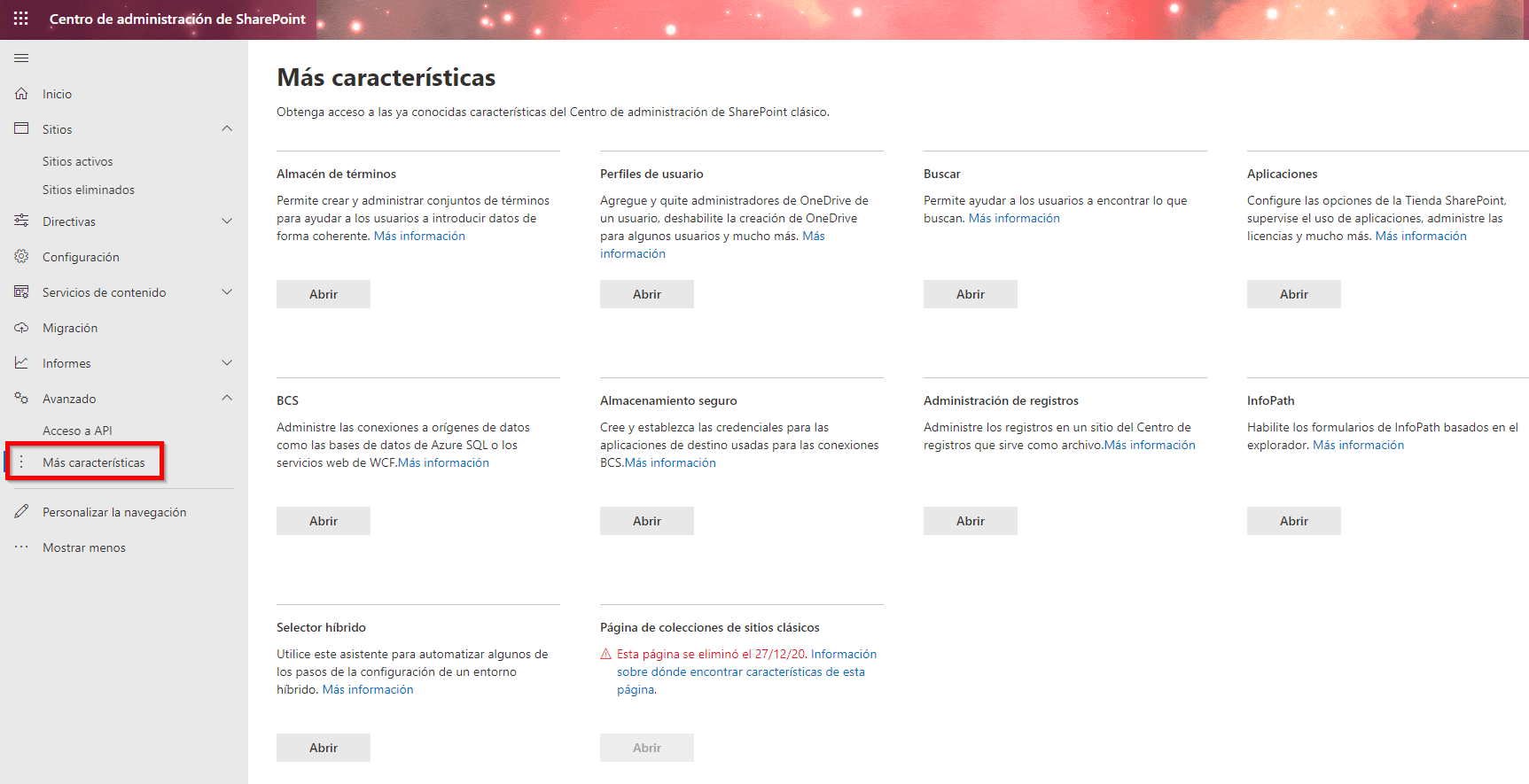
On the other hand, we have the “More features” section. This area provides access to legacy SharePoint features from classic environments, which can still be useful in certain scenarios.
We have now explored additional configuration options available for SharePoint sites. Reviewing these settings can give us new ideas and possibilities for tailoring Microsoft 365 cloud storage to our needs, helping us optimize how we use and configure this Microsoft 365 tool.
By combining these additional options with the ones we already know, we can better control and customize SharePoint Online. If you would like more information about these features or about SharePoint Online in general, feel free to contact us through our usual channels — we’ll be happy to assist you.