


Modificar dimensiones en Business Central es una tarea mucho más sencilla gracias a la posibilidad de actualizar masivamente los movimientos contables. Esta funcionalidad permite corregir errores de forma rápida, mejorar la calidad de la información financiera y ahorrar tiempo en la gestión diaria.
En este artículo descubrirás cómo Dynamics 365 Business Central revoluciona la gestión contable al facilitar la modificación masiva de dimensiones y movimientos contables, mejorando significativamente la precisión y la agilidad en la gestión financiera.
¿Por qué modificar dimensiones en Business Central?
Los retos de la gestión contable en sistemas anteriores
Previously, accountants, finance directors, and accounting clerks faced considerable challenges when correcting errors in the dimensions of ledger entries, especially with legacy systems such as Navision.
The re‑keying of incorrect dimensions was a labor‑intensive, error‑prone process that consumed valuable resources.
Cómo Business Central mejora la gestión contable
Con la evolución hacia Dynamics 365 Business Central, se inaugura una nueva era en la gestión financiera.
Esta plataforma no solo simplifica la corrección de errores en las dimensiones de movimientos contables, sino que también permite realizar un análisis financiero mucho más preciso.
Among its advantages are:
- Corrección masiva de dimensiones.
- Reclasificación analítica de movimientos contables.
- Mayor precisión en la información financiera.
- Ahorro de tiempo en tareas administrativas.
- Mejor soporte para la toma de decisiones.
Ahora es posible seleccionar múltiples movimientos contables y actualizar de manera eficiente las dimensiones asociadas, como la línea de negocio, con solo unos clics.
Paso a paso para modificar dimensiones en Business Central
1. Acceder a los movimientos de contabilidad

Accede al módulo de movimientos de contabilidad dentro de Dynamics 365 Business Central.
Desde aquí podrás visualizar todos los movimientos financieros registrados.
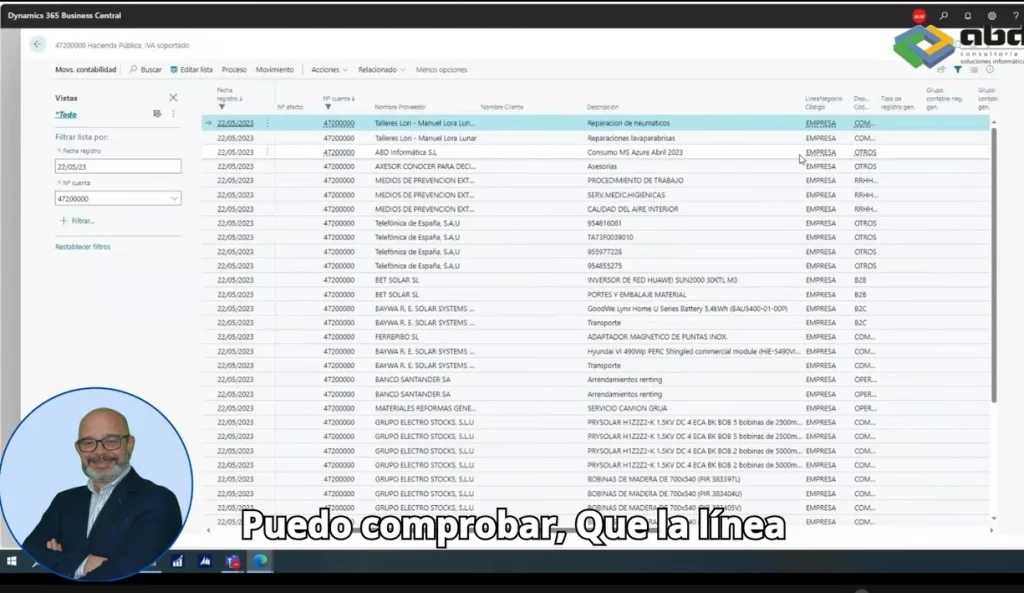
2. Filtrar los movimientos contables

Utiliza los filtros disponibles para localizar únicamente los movimientos que deseas modificar.
For example:
- Cuenta contable.
- Fecha de registro.
- Dimensión.
- Tipo de movimiento.
3. Seleccionar los movimientos
Una vez identificados los registros, selecciona aquellos cuya dimensión deseas modificar.
Puedes seleccionar uno o varios movimientos simultáneamente.
4. Abrir la opción «Dimensiones Correctas»
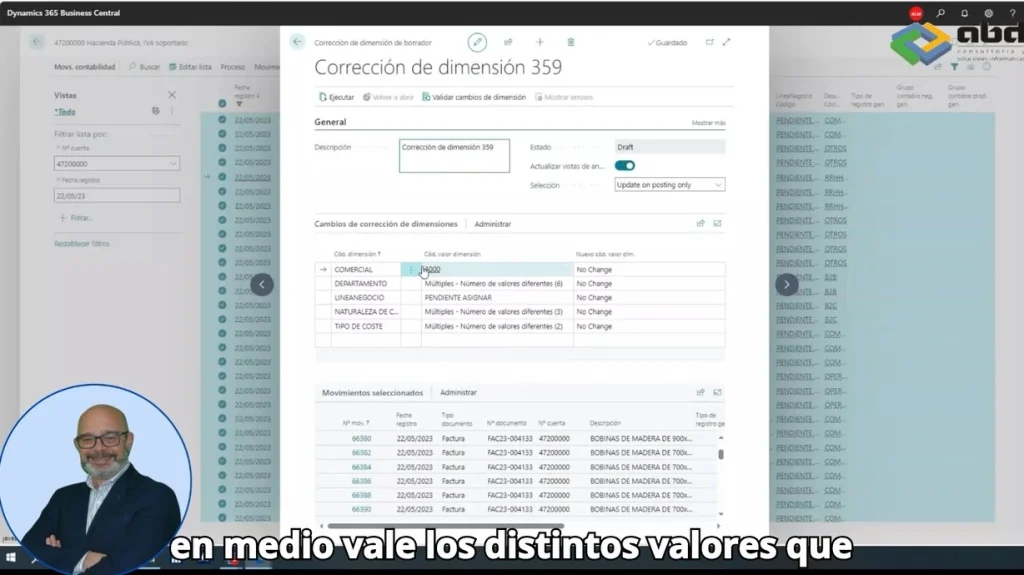
Dentro de la interfaz de movimientos contables, accede a la opción Dimensiones Correctas.
Esta funcionalidad permite realizar modificaciones masivas sobre todos los movimientos seleccionados.
5. Editar las dimensiones

En la pantalla aparecerán:
- Los movimientos seleccionados.
- Las dimensiones actuales.
- Los nuevos valores que deseas aplicar.
Por ejemplo, puedes modificar la línea de negocio para todos los movimientos de una sola vez.
6. Ejecutar la modificación

Una vez revisados los cambios:
- Haz clic en Ejecutar.
- Programa el proceso si prefieres lanzarlo más tarde.
- O ejecútalo inmediatamente.
Business Central aplicará automáticamente las nuevas dimensiones.
7. Verificar el resultado

Una vez completado el proceso, vuelve a consultar los movimientos utilizando los mismos filtros para comprobar que las dimensiones han sido modificadas correctamente.
Esta verificación garantiza la consistencia de la información contable.
Beneficios de modificar dimensiones masivamente
La modificación masiva de dimensiones ofrece numerosas ventajas para cualquier departamento financiero.
Entre ellas destacan:
- Mayor rapidez en las correcciones contables.
- Menor riesgo de errores manuales.
- Información financiera más fiable.
- Mejor análisis de costes y centros de beneficio.
- Mayor productividad del departamento financiero.
Esta funcionalidad resulta especialmente interesante para empresas que están migrando desde Navision hacia Dynamics 365 Business Central, ya que simplifica procesos que anteriormente requerían mucho más esfuerzo.
Business Central facilita una gestión contable más eficiente
La posibilidad de modificar dimensiones de forma masiva convierte a Dynamics 365 Business Central en una herramienta mucho más potente para la gestión financiera.
Además de optimizar los procesos administrativos, permite mantener una información contable consistente y preparada para la toma de decisiones estratégicas.
Gracias a estas capacidades, las empresas pueden mejorar su eficiencia operativa y disponer de una visión mucho más fiable de su situación financiera.
ABD te ayuda a sacar el máximo partido a Business Central
At ABD Consulting and IT Solutions somos especialistas en Microsoft Dynamics 365 Business Central y ayudamos a empresas de todos los sectores a optimizar sus procesos financieros y contables.
Si estás planificando una migración desde Navision, quieres mejorar la gestión de dimensiones o necesitas adaptar Business Central a las necesidades de tu organización, nuestro equipo puede ayudarte a implantar una solución eficiente, segura y totalmente personalizada.
Contact us y descubre cómo aprovechar todo el potencial de Business Central para mejorar la gestión de tu empresa.