

The low‑code development revolution is reaching new heights with the integration of Copilot into Microsoft Power Apps, specifically within its formula language Power Fx.
This update marks a turning point in how developers and business users interact with the platform.
What is Power FX?

Power Fx has long been at the heart of Power Apps, enabling users to build sophisticated business applications without requiring deep programming knowledge.
Now, with the integration of Microsoft Copilot, this capability is significantly amplified, making development more accessible than ever.
The New Capabilities of Copilot in Power Fx
-
Natural‑Language Formula Explanation
Imagine having an instant translator that converts technical code into clear and concise explanations. That is exactly what the new “Explain a Formula” feature offers.
For example:
Sort(Filter(‘marcajesBuffe
(tabla_busines_central)’;tarjeta=Label3.Text)
;fechacreacion&fecha&hora&tarjeta&Ubicacion&estado;SortOrder.Descending)
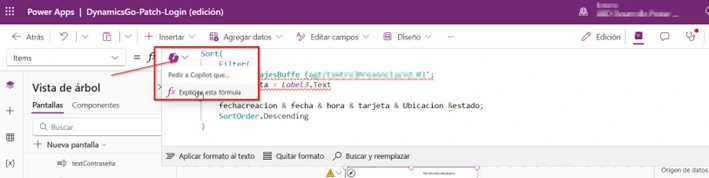
It is automatically translated to:
“Search in the ‘nombredetabla’ table of Dynamics 365 Business Central for all records where the card matches the text displayed in Label3, and then sort them in descending order by creation date, date, time, card, location, and status.”
It is similar to saying: “Give me all the records from this specific card, sorted from newest to oldest, taking into account several sorting criteria.”

-
Natural Language–Based Code Generation
The real magic happens when users can write their needs in everyday language and watch them transform into functional code. By using the “//” prefix, users can describe what they need:

And Copilot will automatically generate the corresponding Power Fx code.
-
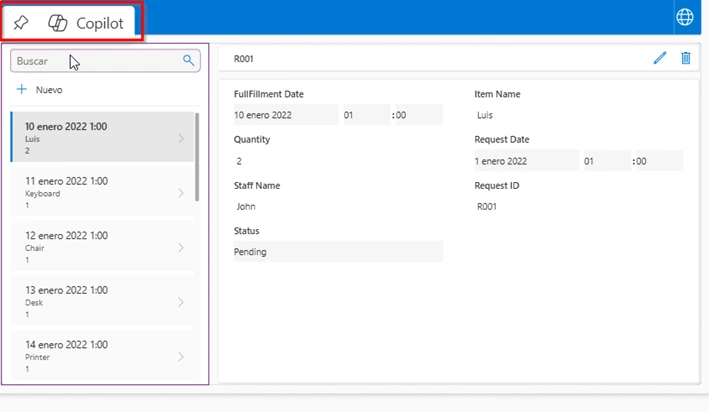
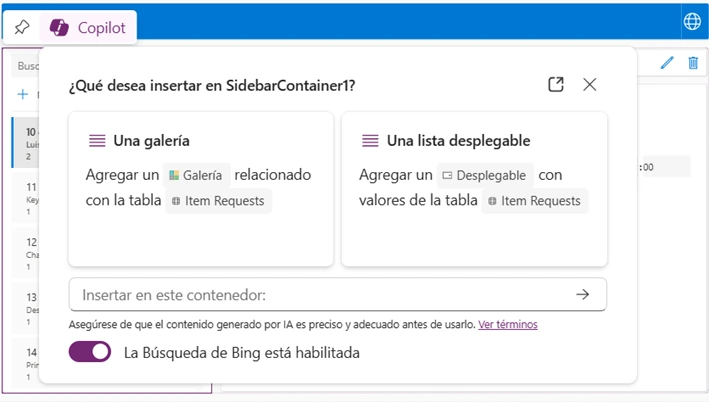
Copilot Inline: A New Dimension of Productivity
The Copilot Inline functionality goes beyond simple code generation. It can now:
- Suggest real‑time improvements for your formulas
- Optimize the performance of existing code
- Provide more efficient alternatives for current formulas
New possibilities brought by the integration of Copilot and Power Fx
Accelerated Learning
A significant advantage that is not commonly mentioned is how this integration accelerates the learning curve. New developers can learn Power Fx more quickly by seeing the bidirectional translations between code and natural
Automatic Documentation
An additional benefit is the ability to generate technical documentation automatically. The natural‑language explanations of formulas can be easily exported to create clear and maintainable application documentation.
Impact on Business Development
- Time-to-Market Reduction
- Time-to-Market Reduction
- Less time spent on debugging
- More agile implementation of changes
- Collaboration Improvement
- Better communication between technical and non‑technical teams
- Easier code reviews
- Greater stakeholder involvement in the development process
- Quality and Maintainability
- Reduction of syntax errors
- More consistent and standardized code
- Improved long‑term maintainability
Best Practices to Make the Most of Copilot in Power Fx

- Progressive Iteration: Start with simple descriptions and gradually refine the generated formulas.
- Cross‑Validation: Use the explanation feature to verify that the generated code meets your requirements.
- Continuous Documentation: Leverage natural‑language explanations to maintain up‑to‑date documentation.
Looking Ahead
The integration of Copilot in Power Fx is only the beginning. We can expect:
- Deeper integration with other Microsoft services
- Predictive analysis capabilities in code suggestions
- Improvements in contextual understanding and domain‑specific code generation
Read also: Microsoft Power Apps: What types of applications can you build for your business?
Future of Low-Code Development with Copilot and Power Fx
The introduction of Copilot in Power Fx represents a quantum leap in low-code development.
Not only does it make development more accessible, but it also improves the quality and efficiency of the development process.

For organizations looking to digitize their processes quickly without compromising quality, this integration provides a significant competitive advantage.
The new Copilot capabilities in Power Fx are not only changing the way we develop applications, they are redefining who can build them.
The future of low-code development has never looked so promising.