

The project billing in Business Central It allows speeding up one of the most important processes for any company: transforming the hours and work done into invoices ready for administration.
Many organizations continue to manage this process manually, using Excel sheets, emails, or disconnected tools. The result is usually the same: delays, errors, and wasted time between departments.
With Microsoft Dynamics 365 Business Central, project managers can generate billing instructions directly from the ERP, transferring the information to the administrative area quickly, organized, and traceable.
In this article, we show you how this process works step by step and why it can help you improve the management of your projects and the productivity of your company.
What is project billing in Business Central
Microsoft Dynamics 365 Business Central includes specific functionalities for project management and their subsequent billing.
This allows that:
- Project managers control billable tasks
- Hours and resources are recorded
- Invoice drafts are generated automatically
- Administration receives the information prepared to register
All of this from a single connected environment.
How project billing works in Business Central
The operation is simple and is designed to facilitate collaboration between the projects area and the administrative department.
Access to the project list
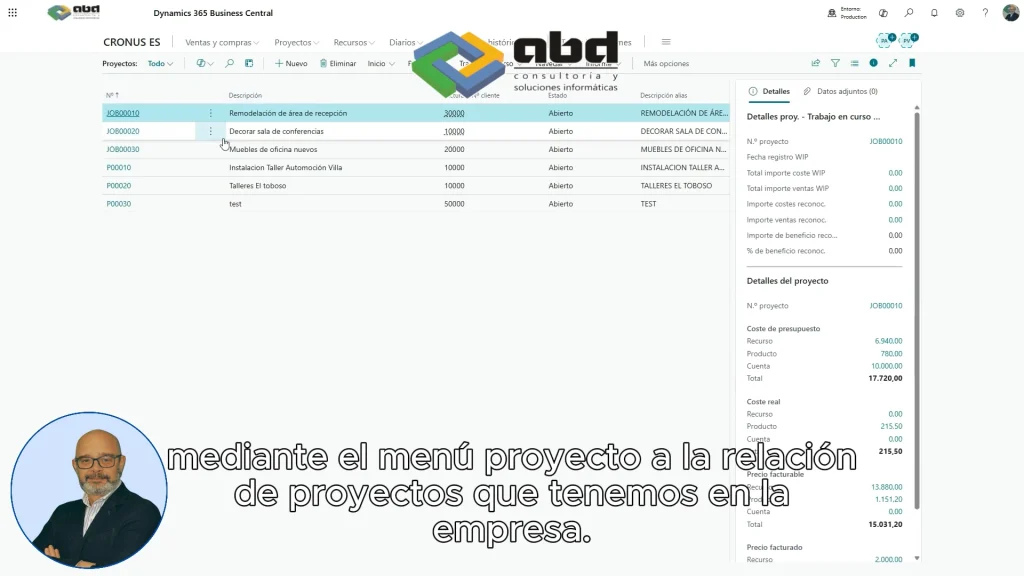
From the role of project manager, the user accesses the projects menu within Business Central.
There you can view:
- Active projects
- The status of each project
- The associated tasks
- Pending billing lines
This centralized access allows having a clear view of all the pending work.
Selection of billable tasks
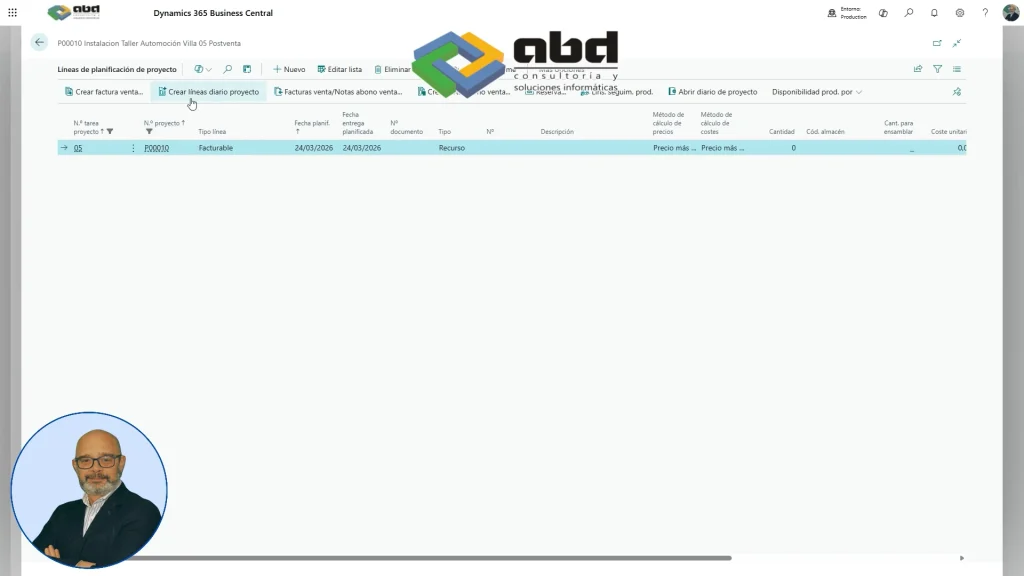
Once inside the project, the corresponding task within the billable area is selected.
Business Central automatically shows:
- Pending billing lines
- The hours worked
- The assigned resource
- The associated amount
For example, in the case shown in the video:
- The enforcing party is Alfredo Maldonado
- 5 hours of work are recorded
- The system automatically calculates the amount according to the defined sale price
This reduces manual errors and speeds up the invoice preparation process.
Generation of invoice drafts
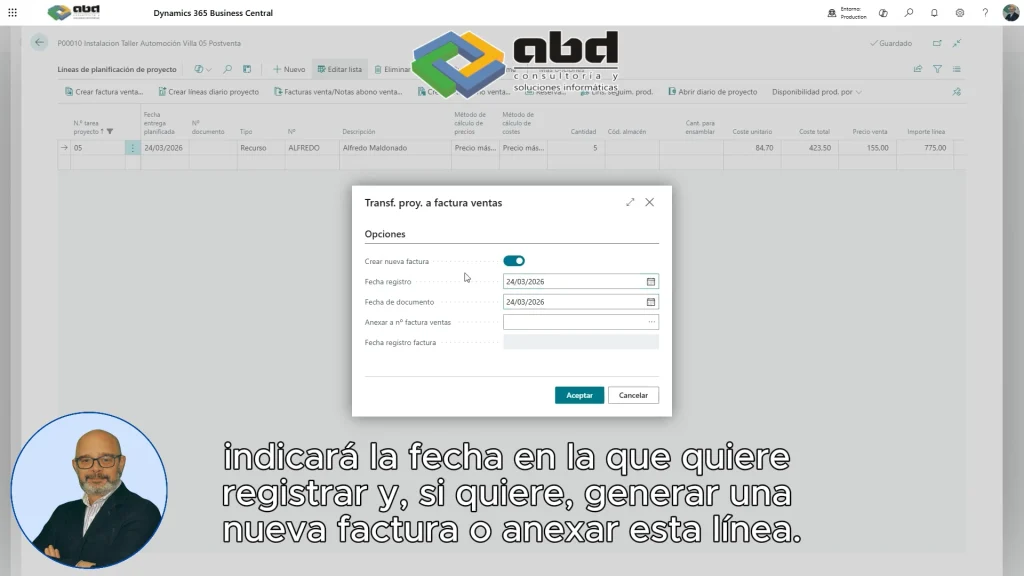
The next step is to create the sales invoice drafts.
The director or project manager can indicate:
- The registration date
- If you want to create a new invoice
- Or attach the line to an existing invoice
Once the process is confirmed, the lines are automatically transferred to a sales invoice.
How administration receives invoices in Business Central
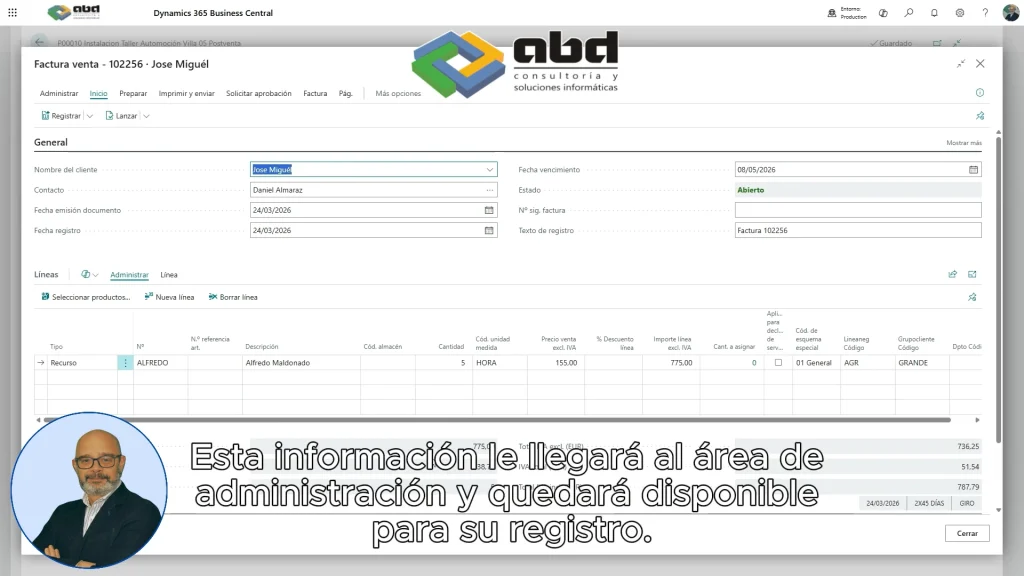
One of the great advantages of this system is the connection between departments.
The information generated from projects is automatically available to the administration area within:
- Sales invoices
- Credit notes
- Documents pending registration
This prevents:
- Duplication of work
- Transcription errors
- Manual exchange of information
In addition, all traceability is recorded within the ERP.
Advantages of managing projects and billing from an ERP
Centralizing project management and billing in Business Central brings clear advantages.
Greater financial control
Each hour billed is linked to the project and the corresponding amount.
This enables organizations to:
- Control profitability
- Analyze deviations
- Improve forecasts
Less manual tasks
Automating invoice generation avoids repetitive processes and reduces human errors.
According to different studies on business automation, administrative teams can reduce up to 30% of the time spent on manual tasks when using integrated processes in ERP.
Better communication between departments
Projects and administration work on the same information and in real time.
This improves:
- Internal coordination
- Billing speed
- The economic monitoring of projects
Why Business Central is a good solution for service companies

Companies that work by projects need to control:
- Hours
- Resources
- Costs
- Invoicing
- Cost-effectiveness
Business Central allows all of this to be integrated into a single platform.
In addition, by being connected with the Microsoft ecosystem, it is possible to complement management with:
- Power BI for analysis
- Microsoft 365 for collaboration
- Power Automate for automations
Practical example of invoicing in Business Central
Imagine a technology consulting company.
A project manager records the hours worked by the team during a week.
Instead of sending emails to administration or generating manual documents:
- Select the billable lines
- Generate the invoice draft
- Administration receives the invoice ready to validate
The result:
- Fewer errors
- More speed
- Better financial and operational control
How ABD can help you with Business Central
At ABD Consulting and IT Solutions We help companies optimize their management processes through solutions based on Business Central.
We can help you with:
- Implement Business Central
- Automate billing processes
- Improve project management
- Integrate departments and data
- Adapt the ERP to your operations
The project invoicing in Business Central It allows transforming a traditionally manual process into a much faster, connected, and efficient operation.
Thanks to automation and the integration between projects and administration, companies can reduce errors, speed up invoicing, and have greater control over the profitability of their projects.
If you want to find out how to apply this type of processes in your company, at ABD we can help you implement and adapt Business Central to your real needs.
Contact our team and we will analyze your case without obligation.
