

The management of withholdings in Business Central takes an important step forward with the arrival of version 28 for SaaS environments. Microsoft includes for the first time a standard feature that allows configuring and accounting for withholdings without the need for custom developments, simplifying both the implementation and maintenance of the ERP.
If your company works with professionals, freelancers, leases, or activities subject to withholding, this update represents a significant improvement. In this article, we explain how it works, how to set it up, and what impact it has on the purchasing process.
What's changing with withholdings in Business Central version 28?
Until now, managing withholdings in Business Central usually required custom developments or third-party solutions to comply with tax regulations.
With version 28, Microsoft includes a standard model that aims for three main goals:
- Standardize the management of withholdings.
- Simplify the system setup.
- Reduce maintenance and custom developments.
The result is a functionality built right into the ERP itself, aligned with the standard Business Central architecture and ready to evolve in future versions.
Advantages of using the standard withholding feature
Adopting this new feature offers both technical and operational benefits:
- Less dependence on custom developments.
- Centralized and simpler setup.
- Greater consistency in accounting.
- Better maintenance after Business Central updates.
- Reduction of the risk of errors when applying withholdings.
For companies working in SaaS environments, it also represents a significant improvement in the stability of the solution and in the ease of incorporating future Microsoft updates.
Withholding Setup in Business Central
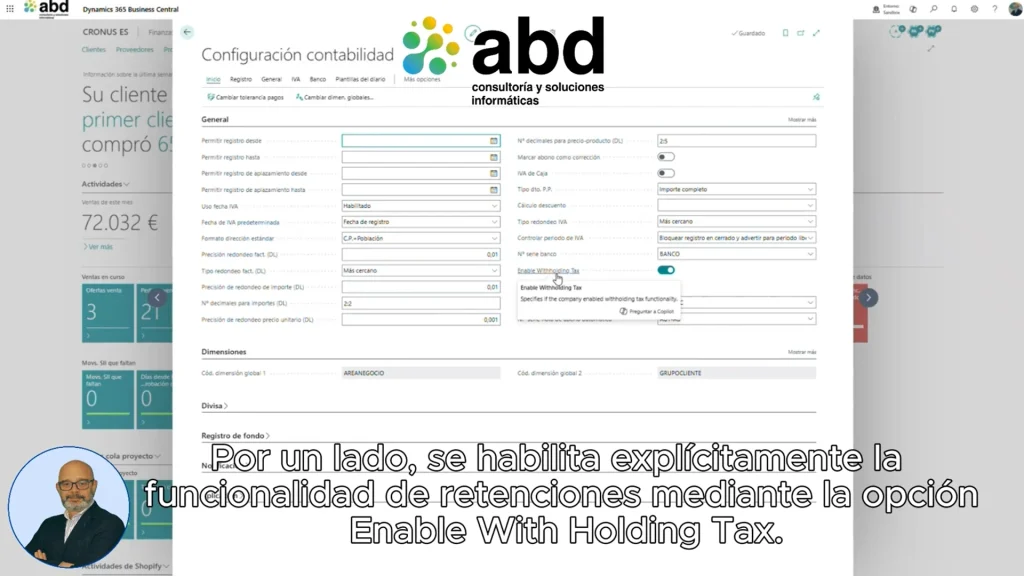
The new feature includes several configuration options that let you tailor the withholding behavior to each organization's needs.
Enable the withholding feature
The first step is to enable the option:
Enable Withholding Tax
This setting turns the use of withholdings on or off within the system in a controlled way.
This way, companies can decide when to start using the new standard model.
Set up the rounding of amounts
The option is also included:
Round Payment Amount With Withholding Tax
This setting allows you to control the rounding of withholding amounts at the time of payment.
Although it may seem like a minor detail, from a financial point of view it is very important, since it can affect the amount ultimately paid to the supplier.
The standard withholding model in Business Central
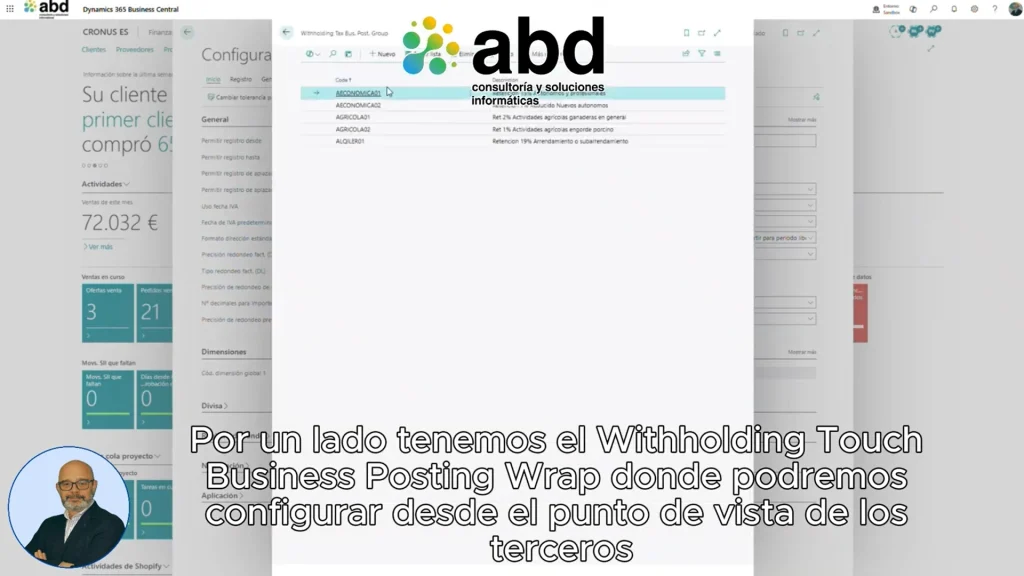
Microsoft has designed this feature following the same philosophy as other ERP components: using record groups to make configuration easier.
Withholding Tax Business Posting Group
This group defines the withholdings associated with the third party.
For example, it allows you to classify suppliers according to:
- Professionals with a 15% withholding.
- New freelancers with reduced withholding.
- Agricultural and livestock activities.
- Urban leases.
- Other types of withholding defined by the company.
This way, the setup is linked to the supplier and there's no need to configure each document individually.
Withholding Tax Product Posting Group
This second group is related to the product or the accounting account.
Here the corresponding withholding percentage is set for each type of expense or product.
For example:
- Professional fees with a 15% withholding.
- Agricultural products with a 1% withholding.
How Withholding Tax Posting Setup Works
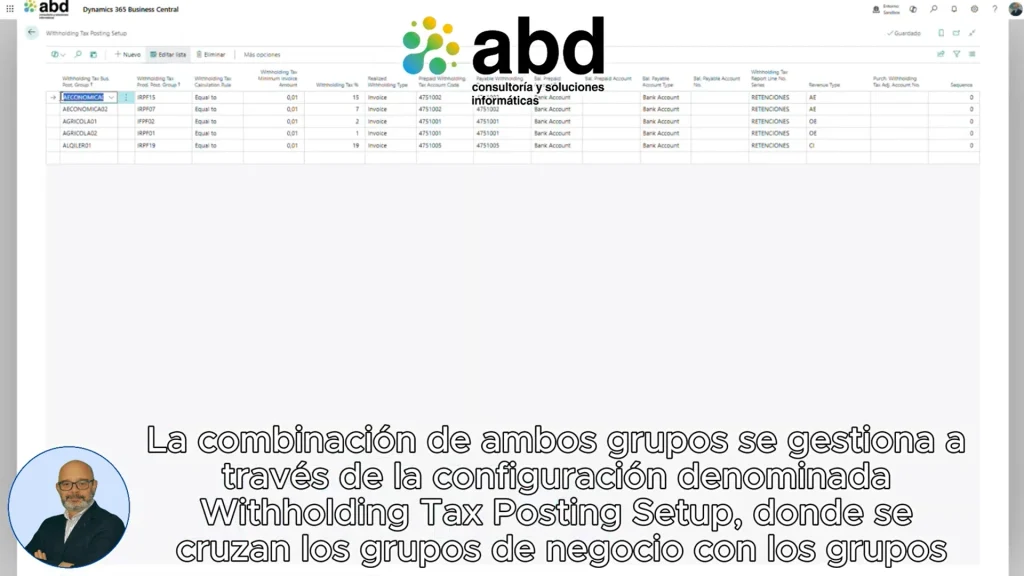
The centerpiece of the model is the configuration called:
Withholding Tax Posting Setup
This is where the business groups cross with the product groups to determine:
- The retention rate.
- The minimum amount from which it applies.
- The withholding accounting accounts.
- The corresponding type of withholding.
Also, it will be necessary to define a number series to correctly record the withholding transactions.
This approach allows you to keep a much more organized and easily scalable setup.
How to set up suppliers, accounts, and products
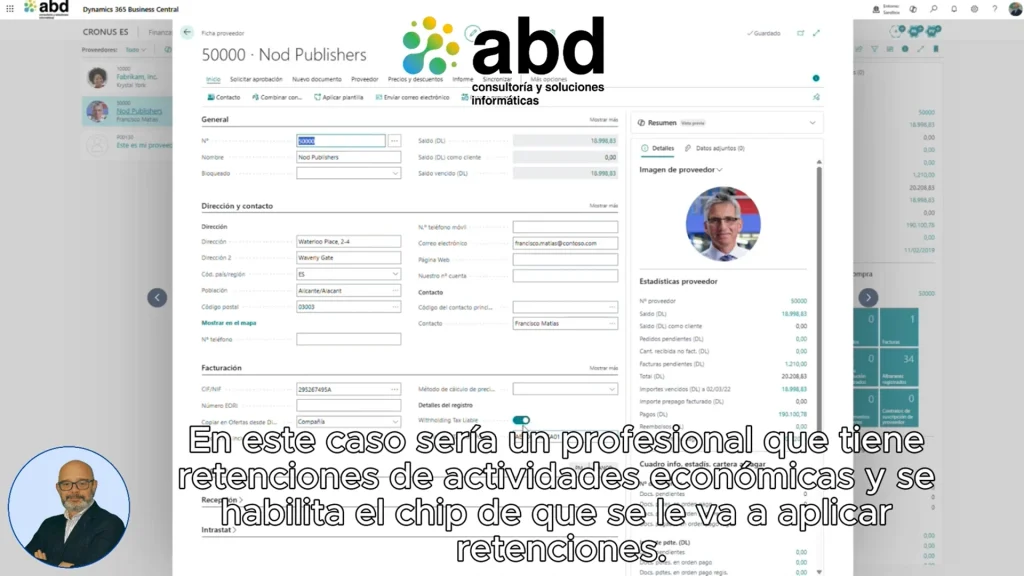
Once the general structure is defined, the setup continues with different elements of the ERP.
Provider settings
In the supplier's form, the following is assigned:
- The retention business group.
- The activation of the indicator that reports that this provider is subject to withholdings.
For example, a freelance professional can automatically be set up with a withholding for economic activities.
Accounting account setup
The accounts also include new parameters:
- Retention base.
- Business group.
- Product group.
This allows you to fully automate the calculation when recording invoices.
Product setup
The same logic can be applied directly to the products.
For example, certain agricultural products can be set with a specific 1% withholding, while other products will use different percentages.
How withholdings affect the buying process
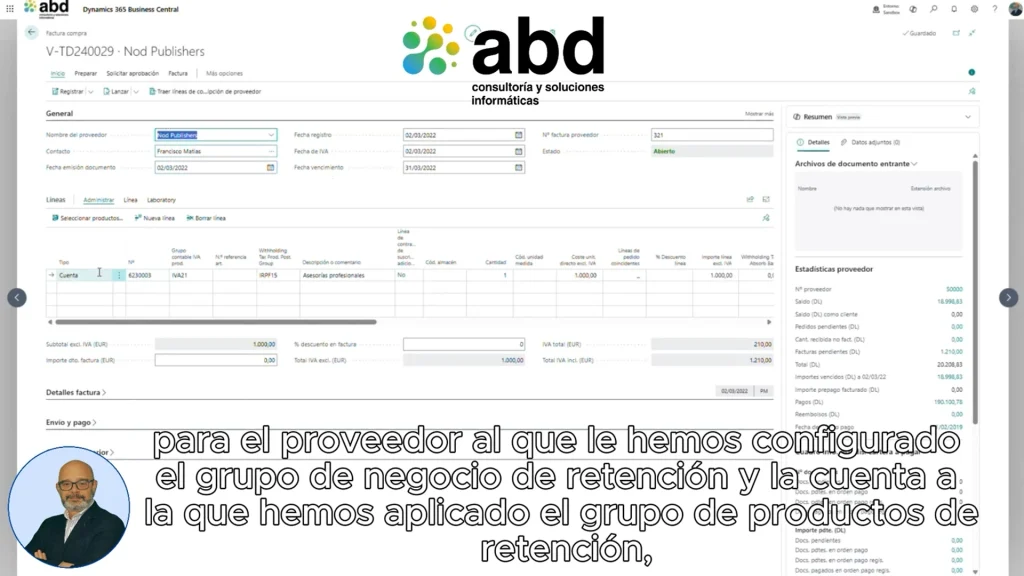
One of the main advantages of this feature is that the withholdings are applied automatically when the invoice is recorded.
Purchase invoice record
When a purchase invoice is created for a vendor set up with withholding and an account or product associated with a withholding group is used, Business Central automatically calculates:
- Retention base.
- Withheld amount.
- Type of calculation applied.
All of this without any manual intervention from the user.
Automatic withholding registration
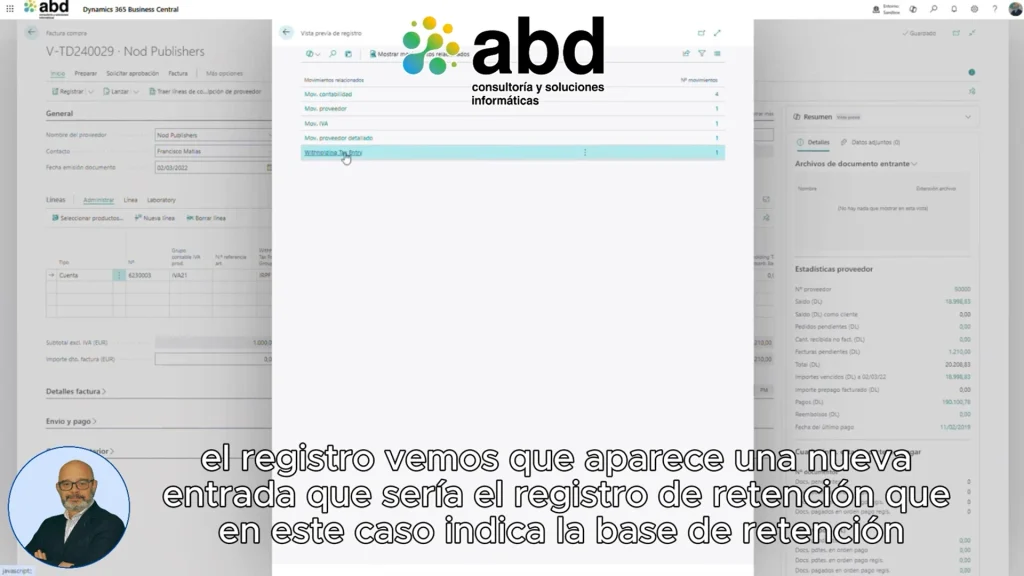
After recording the invoice, the system generates a new specific withholding record where the following are stored:
- Retention base.
- Withheld amount.
- Business group.
- Product group.
- Type of calculation.
This information makes both internal tracking and future tax obligations easier.
Impact on accounting
In the accounting entries, it also automatically shows:
- The taxable base.
- The corresponding VAT.
- The amount of the withholding.
- The accounting account set up to record the withheld debt.
As a result, the amount owed to the supplier is automatically reduced according to the withholding applied.
Practical case
Let's imagine a company that receives a bill from a tax advisor.
The supplier is set up as a professional subject to a 15% withholding.
The expense account used also has the corresponding product group.
When registering the invoice:
- Business Central automatically calculates the withholding.
- Generate the accounting entry.
- Record the retention entry.
- Reduce the amount pending payment to the supplier.
All that without manual calculations or any additional customizations.
Which companies benefit especially from this feature?
The new standard withholding management is especially useful for organizations that work with:
- Freelancers.
- Independent professionals.
- Professional offices.
- Farming and livestock companies.
- Landlords.
- Companies with multiple suppliers subject to withholding.
It's also a really interesting improvement for partners and IT departments, since it considerably reduces the maintenance of customizations.
A feature aligned with Microsoft's cloud strategy
The inclusion of withholdings in Business Central shows Microsoft's commitment to expanding the ERP's standard capabilities and reducing the need for custom developments.
In addition to making implementation easier, this strategy allows future updates to be much simpler, especially in SaaS environments, where maintaining a standard solution is a competitive advantage.
ABD, your partner in implementing Business Central
The new withholdings in Business Central version 28 It simplifies one of the most common tax processes for many companies.
Thanks to a standard model based on record groups, the setup is simpler, accounting is automated, and a large part of the dependence on custom developments disappears.
If your company works with Business Central and you want to prepare for the transition to version 28 or see how to properly implement this functionality, having a specialized partner can help you take advantage of all its benefits from day one.
At ABD Consulting and IT Solutions we are specialists in Dynamics 365 Business CentralWe help you implement the latest updates of Microsoft's ERP and optimize your financial processes so your company can gain in efficiency, control, and productivity. Get in touch with our team and find out how we can help you.
Frequently Asked Questions About Withholdings in Business Central
Since which version are standard withholdings available in Business Central?
The standard withholding functionality is included starting from Business Central version 28 for SaaS environments.
Is it necessary to develop an extension to use withholdings?
No. Microsoft has built this functionality in natively, removing the need for custom developments in many cases.
What types of withholdings can be set up?
It is possible to set up withholdings for professionals, new freelancers, agricultural and livestock activities, rentals, and any other scenario defined through record groups.
Are withholdings applied automatically on invoices?
Yes. If the supplier and the product or account are set up correctly, Business Central automatically calculates and posts the withholding when you record the invoice.
Is this feature available in Business Central on-premise?
According to the information presented in the current version, the standard functionality is initially incorporated for Business Central SaaS.