

When you receive material from a supplier, one question is key: How do you know it meets your specifications before using it or storing it as available material?
The quality control in Business Central It allows you to automate this process within the purchasing flow itself. Instead of managing inspections with Excel, paper documents, or separate systems, you can create quality checks linked to the reception, check the defined parameters, and block the batches that don't meet the requirements.
In this article, we see step by step how this process works with Quality Management, from setting up the tests to managing a non-conformity.
What is Quality Management in Business Central?
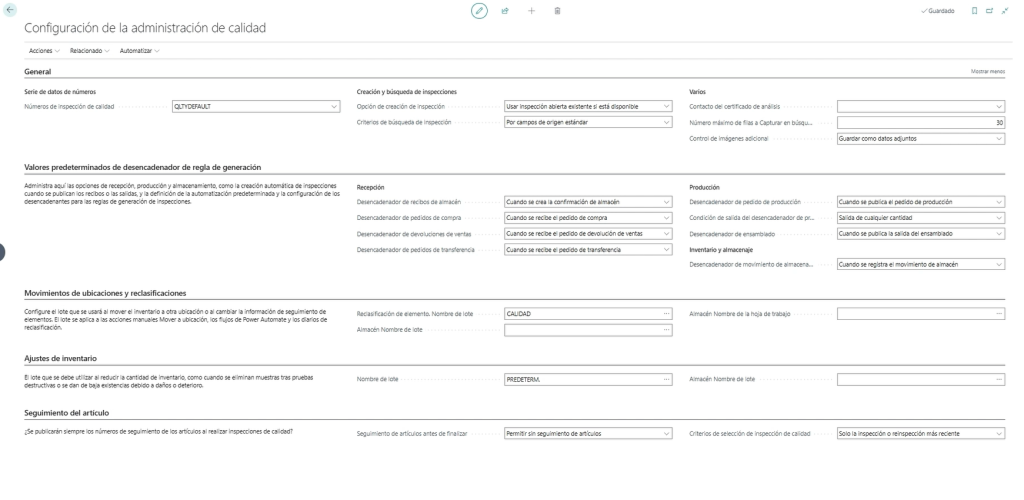
Quality Management It's an extension built into Microsoft Dynamics 365 Business Central that lets you manage quality control and inspection processes right from the ERP itself.
The main advantage is that quality isn't managed as an isolated process. The inspection is integrated into the purchasing flow and linked to the receipt of the material, which allows maintaining the traceability of what happened.
In this example, we focus on a specific scenario: quality control during the receipt of a purchase.
The overall operation is simple:
- The receipt of the material is recorded.
- Business Central generates the quality inspection according to the configured rules.
- The batch stays locked while the check is pending.
- The inspector records the test results.
- If the material meets the criteria, the batch is released.
- If it doesn't meet the requirements, the batch stays locked and the nonconformity can be managed.
In this way, The system prevents material that hasn't passed inspection yet from being used in other processes.
How do you set up quality control in Business Central?

Quality management relies on different configuration elements. Among them, we find the quality tests, inspection templates, and inspection generation rules.
Define the quality tests
The tests allow you to determine what aspect of the product is going to be checked and what the criteria are to consider it approved or rejected.
For example, let's imagine we want to control the thickness of a metal sheet.
We can set up:
- Minimum allowed value: 1,50 mm.
- Maximum allowed value: 2,50 mm.
- Required range to pass: between 1,90 y 2,10 mm.
This way, the system can determine if the value recorded during the inspection meets the established conditions.
We can also set up visual checks.
For example:
Is there rust on the material?
In this case, the inspector can determine during reception whether the product has this defect or not.
These tests are the foundation on which inspections are later built.
Create receiving inspection templates
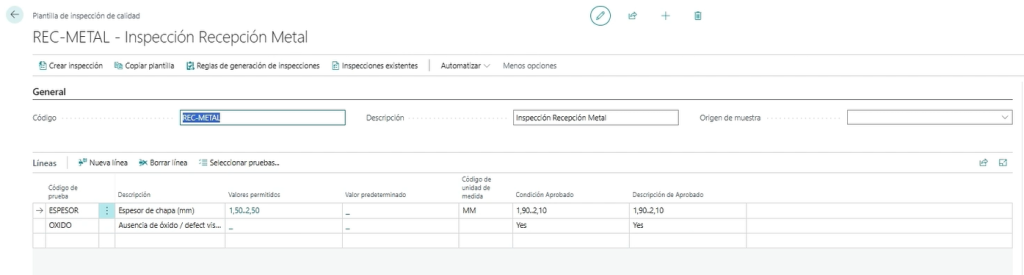
Once the tests are defined, we can group them using an inspection template.
For example, we can create a template called:
Metal Receiving Inspection
This template can include the two previous checks:
- Thickness control.
- Visual check for the presence of rust.
So, when an inspection is generated for that type of material, the inspector will have the checks they need to carry out already defined.
This allows standardize quality control and prevent each reception from being handled in a different way.
Set up the inspection generation rules

The next step is to define when a quality inspection should be generated automatically.
The rules allow you to set the criteria that must be met to trigger the control.
For example, we can set a rule for:
- Purchase order receipts.
- Lines whose quantity is greater than zero.
- A specific product.
- A family or group of products.
- A certain generation behavior.
In our example, the rule is set so that The inspection happens when the purchase order is received.
This is important because it allows you to adapt control to the real needs of each company. Not all products necessarily have to undergo the same tests, nor do all suppliers have to follow exactly the same process.
What happens when we receive the material?
Let's now look at the complete process from a purchase receipt.
We have a purchase order from a supplier and a line corresponding to the material we want to receive.
Before recording the reception, we can access the product tracking line and assign a batch number.
The batch can be automatic or correspond to the batch number provided by the supplier.
Next:
- We assign the batch.
- We enter the supplier's delivery note number.
- We recorded the reception.
At that moment, Business Central It automatically generates the quality inspection because the conditions defined in the generation rule are met.
But there's another important aspect: the batch remains locked.
Why does the batch get blocked?
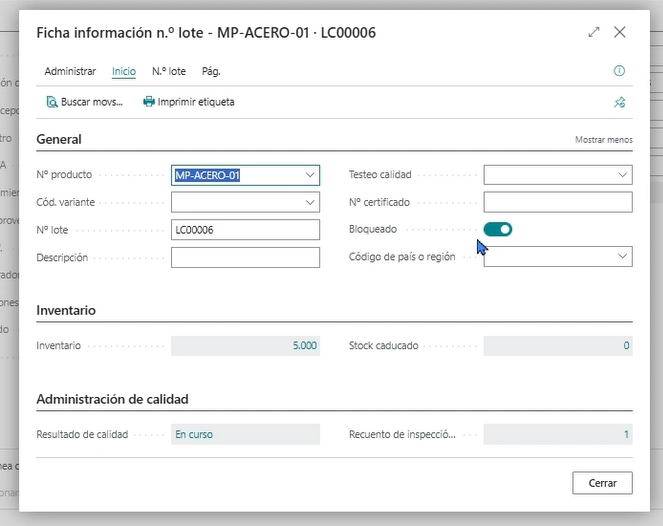
The blockage follows the workflow defined for quality control.
If a product needs to pass an inspection, it wouldn't make sense for it to be used before knowing the result.
That's why, while the inspection is pending, the batch stays locked.
The quality result initially appears as in progress, until the inspector completes the corresponding checks.
How is a quality inspection done?
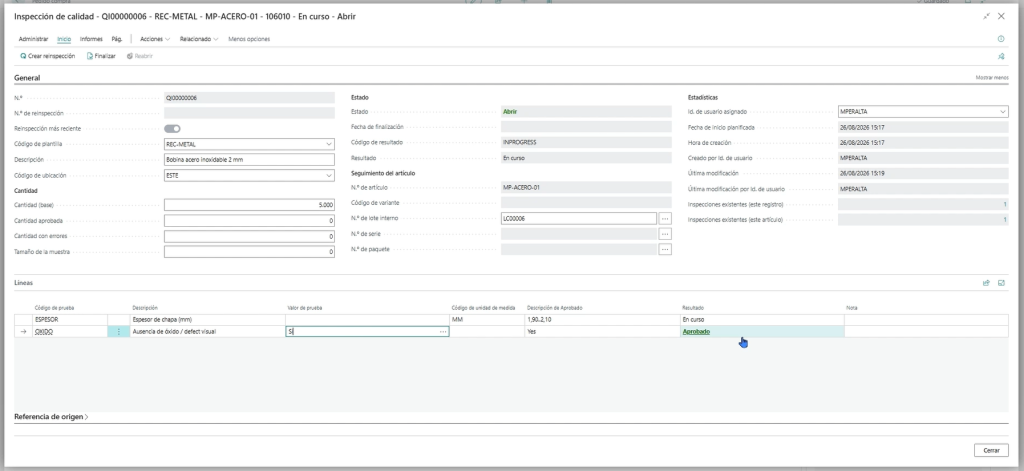
The inspector can directly access the generated inspection and record the parameters defined in the template.
In our example, we have two tests.
First test: visual inspection
The inspector visually checks the material and determines that there is no rust.
Therefore, this check is marked as approved.
Second test: check the thickness
Below is the value obtained during the measurement.
Let's remember that the passing range was set between 1,90 y 2,10 mm.
If we enter, for example, a value of 2,30 mm, Business Central determines that the result does not meet the defined criteria.
Therefore, the test is marked as failed.
The inspector can also add comments and set the overall result of the inspection.
In this case, the final result will be failed.
What happens if the batch doesn't pass quality control?
This is one of the most interesting points of the process.
When we finish an inspection with a failed result, the lot is still locked.
This means that the material can't normally be used for later operations.
For example, we won't be able to use it for:
- Sales.
- Production consumptions.
- Other transactions that require using that material.
In this way, Business Central prevents a product that doesn’t meet quality standards from ending up being used in the business.
How to handle a nonconformity?
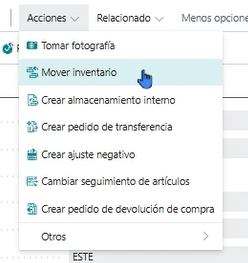
When a material doesn't pass inspection, the next step is to handle the corresponding nonconformity.
Depending on the company's needs, we can adopt different measures.
Move the material to quarantine
One possibility is to move the material to a quarantine warehouse.
For this, we can create a transfer order and physically separate the material that doesn't meet the requirements from the rest of the available stock.
Write off the material
Another option is to carry out a negative adjustment to withdraw the product when it is determined that it cannot be used.
Return the material to the supplier
We can also manage one return to the supplier when the material received does not meet the agreed specifications.
The treatment will depend on the quality procedures defined by each organization.
What happens when the material passes inspection?
The process works in reverse when all the checks are satisfactory.
If the material meets the defined criteria:
Inspection approved → batch released → material available for use.
Through the configured unlock flow, the batch is released and can be used normally in the corresponding processes.
So, quality control acts as a checkpoint before the material actually enters the company's operational flow.
Advantages of automating quality control in Business Central
Integrating quality inspection into the ERP brings several advantages compared to managing these checks with spreadsheets or separate documents.
Greater traceability
The inspections are related to the receiving process and the corresponding batch.
This makes it easier to know what material was received, when it was inspected, what tests were carried out, and what the result was.
Avoid using non-compliant materials
The batch's automatic lock allows you to set up a barrier before the material can be used in other processes.
More standardized quality processes
Tests and templates let you set in advance what needs to be checked and what the acceptance criteria are.
Fewer manual processes
The automatic generation of inspections reduces the need to create checks manually after each receipt.
Integrated management in the ERP
Quality is part of the purchasing and warehouse process, avoiding the need to rely on separate systems to manage inspections.
A simple example of the quality control flow
We can sum up the whole process with this example:
Purchase order → receiving → batch assignment → automatic inspection generation → batch blocked → quality testing → inspection result → release or non-conformance management.
If the material meets the criteria:
Approved → batch unlocked → material available.
If you don't meet them:
Failed → blocked batch → quarantine, discard, or return to supplier.
This flow lets you turn quality control into an integrated part of the receiving process.
Conclusion: integrated, automatic, and traceable quality
The quality control in Business Central It allows you to integrate inspections directly into the purchasing reception process.
Instead of checking the material with external tools and then deciding if it can be used, the ERP can generate the inspection, keep the batch blocked while it's pending, and monitor what happens when the material passes or fails the established tests.
The result is a more integrated, traceable, and aligned quality process with the company's daily operations.
If your organization needs to control the quality of raw materials, products, or materials received from suppliers, in ABD Consulting and IT Solutions we can help you analyze how to adapt this process to your Business Central environment.
Do you want to know how quality control would work in Business Central for your company? Get in touch with ABD and we help you define the right flow.