

If we look at the article title, we find a new element when naming the Windows 11 update. We see that after 22H2, the nomenclature referring to the last major operating system update, Moment 2 appears.
This means we are facing the first major Windows 11 update for 2023 and we will have to get used to these designations since this is how Microsoft will name the most important updates from now on.
The update calendar remains the same, that is, with monthly updates on the second Tuesday of each month, mainly to fix security issues. But the cycle of major updates, so to speak, will follow this nomenclature and will take place during the three years from the release of Windows 11 until the supposed arrival of Windows 12.
For now, let's refer to the new features of Windows 11 22H2 Moment 2 and what it brings. There are no major changes or a revolution in terms of interface or way of working. Even so, we will mention the most notable ones here:
- Introduction of Bing with AI as a search tool: AI (artificial intelligence) is incorporated into Bing searches so that results are more efficient and even, through simple commands, we can send instructions to the operating system to perform actions for us. It is Microsoft's bet to unseat Google as the main search engine and make Bing the reference in searches.

- Phone Link for Android and iOS: This is a tool to sync our mobile phones with Windows 11. This tool incorporates functionality and security improvements. It was already available for Android and now debuts for iOS.
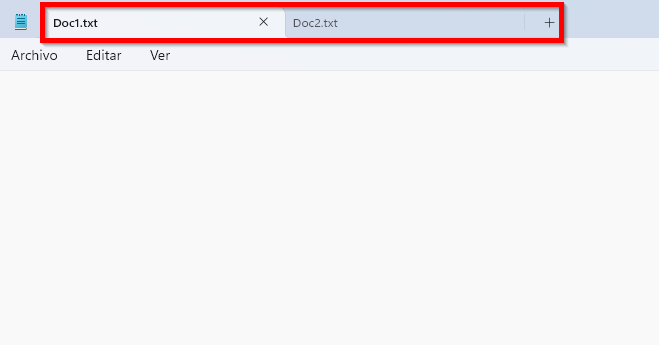
- New version of the Notepad app: Without a doubt, this is one of the most used tools in Windows systems. Now it incorporates a highly anticipated improvement: tabs to improve data usage and work with the tool. It also includes improvements in searches and replacements.
- Microsoft Teams: Windows 11 already included this tool by default. Now it includes possibilities to improve video and audio effects and the ability to manage this from the toolbar.
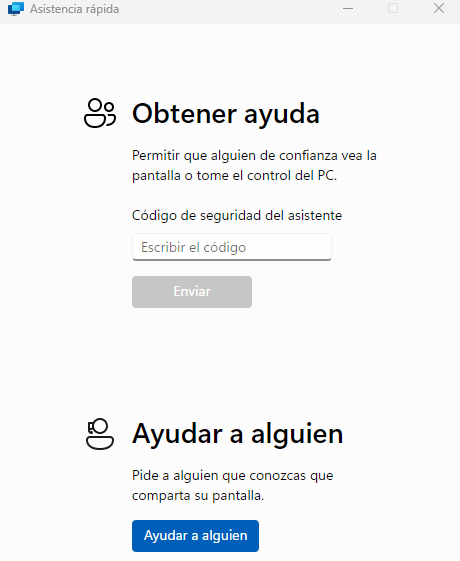
- Revamp and improvements to the Quick Assist tool: Through this tool we can give or receive support from a third party. Already existing since Windows 10, it now incorporates the ability to change control mode within the session or the existence of a new laser pointer to highlight our actions.
We have made a small review of the new features included in Windows 11 22H2 Moment 2. They are not very striking or standout updates but they are important as they will help us make better use of our system.
As always, from ABD Consulting and IT Solutions we will be attentive to the news within the Windows family and keep you up to date. If you want more information about this update or Windows 11, don't hesitate to contact us through our usual channels and we will help you.