If you are an IT administrator and you’ve been informed that a user cannot access Microsoft 365 resources because the installed Office applications indicate that they do not have an active license, then it’s important to verify the licenses assigned to that user.

If you’ve confirmed that the user does have a license, then you need to make sure that you have enough available licenses to assign to users.
Before diving into how to view an Office 365 license, it’s important to understand how these licenses impact your team’s productivity. Proper license management ensures that all users have access to the tools they need.
But how can you verify Microsoft licenses?
The answer lies in the «Microsoft License Verification» section within the Microsoft 365 portal where you can check which licenses are available and who they have been assigned to.
To access Microsoft License Verification, go to the Billing / Licenses section in the Microsoft 365 portal.
There, you will find a complete inventory of the different types of licenses available, as well as the number of assignments made for each one.
Additionally, by clicking on each license type, you can view the list of users who have been assigned that specific license.
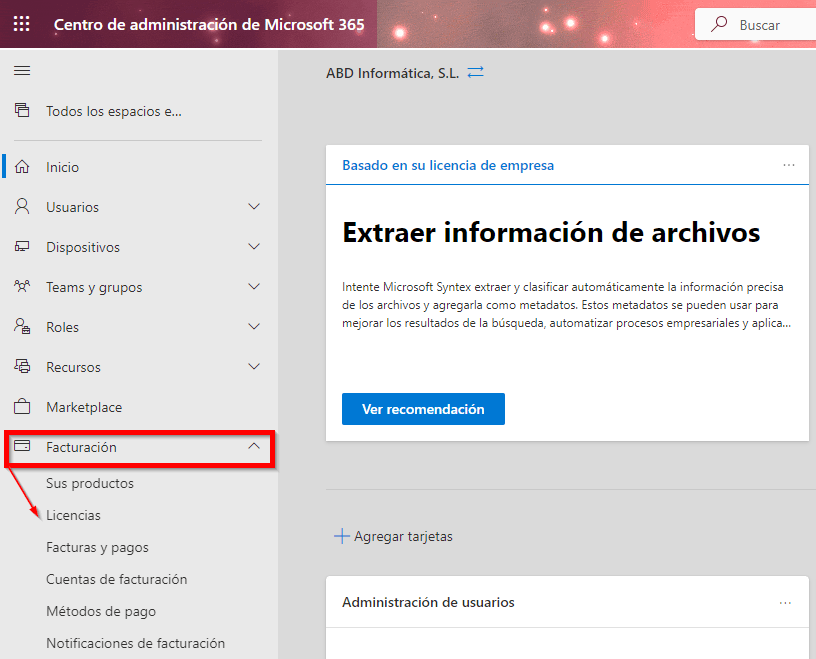
What will you find in the Microsoft License Verification section?
In this section, you will find a complete inventory of the different types of Office licenses available, as well as the number of assignments made for each one.
Additionally, by clicking on each license type, you can view the list of users who have been assigned that specific license.

License Subscription Expiration
Another important aspect to keep in mind is the expiration date of the license subscriptions you have purchased.
You can find this information in the “Your Products”section, which will allow you to make informed decisions about license renewals and prevent users from losing access to services.

In conclusion, verifying Microsoft 365 icenses not only helps you understand how to determine which Office 365 license you have, but also ensures effective management of the tools within your organization.
Keeping licenses up to date contributes to a more productive and efficient work environment.
If you want more information about Microsoft 365 licenses or would like to know the latest competitive pricing, feel free to contact us.
We’re here to help.
Take advantage of our exclusive offers on M365 licenses for businesses and maximize your investment.