


In this article we will talk about the Quick Entry property in Dynamics 365 Business Central. This feature, discovered thanks to my colleague, has become one of my favorites due to its effectiveness when entering data on a screen quickly and efficiently, without having to click on each field individually.
Have you felt overwhelmed by the amount of data you need to enter when testing the functionalities you develop? Don't worry, the Quick Entry property is here to save the day! It's like using a shortcut to enter data.
This simple yet powerful feature allows you to enter data on a screen quickly and efficiently, without having to click on each field individually. It's like using a shortcut to enter data!
For example, if we wanted to create a purchase order, we would fill in the fields using the Tab key to complete the information.

With Quick Entry configured and the Enter key, we could fill in the minimum information in the purchase header and then move very quickly to the sales lines.


To use Quick Entry in Dynamics 365 Business Central, there are two ways:
Methodology
1) From Personalize, which allows the user to adapt and customize Business Central to the way they or their department usually enter data.
Select the settings icon in the upper right corner and then select Personalize.

For the test, we configure in the purchase header, the field "Address"and "Address 2" as Include from Quick Entry. And the field "Vendor order no." as Exclude from Quick Entry.


2) From code. Dynamics 365 Business Central programmers can define an initial Quick Entry field path per page in their extension, as well as adapt it to specific role profiles.
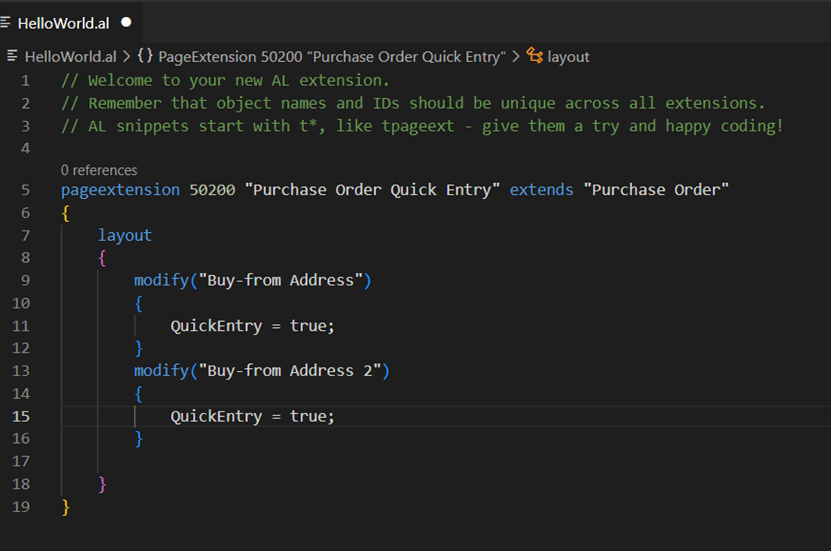
This way, with the Quick Entry property, you can enter data in Dynamics 365 Business Central quickly and efficiently, and without unnecessary distractions!
For more information, you can check Microsoft's official documentation. Don't miss the opportunity to improve your productivity with the Dynamics 365 Quick Entry property!
I hope you find it helpful.
Dynamics 365 Development
ABD Consulting and IT Solutions