


We all seek to save on the resources we use, both in our personal and professional lives. Good cost management and control can make this savings visible in the medium and long term. Knowing what we spend and what we can do to reduce costs can help us achieve our goal. With Microsoft Azure, we can achieve these savings without our work pace dropping or the performance of our tools decreasing.
In this post, we'll show what we can do to control savings and coherently manage our resources.
Knowledge and cost forecasting
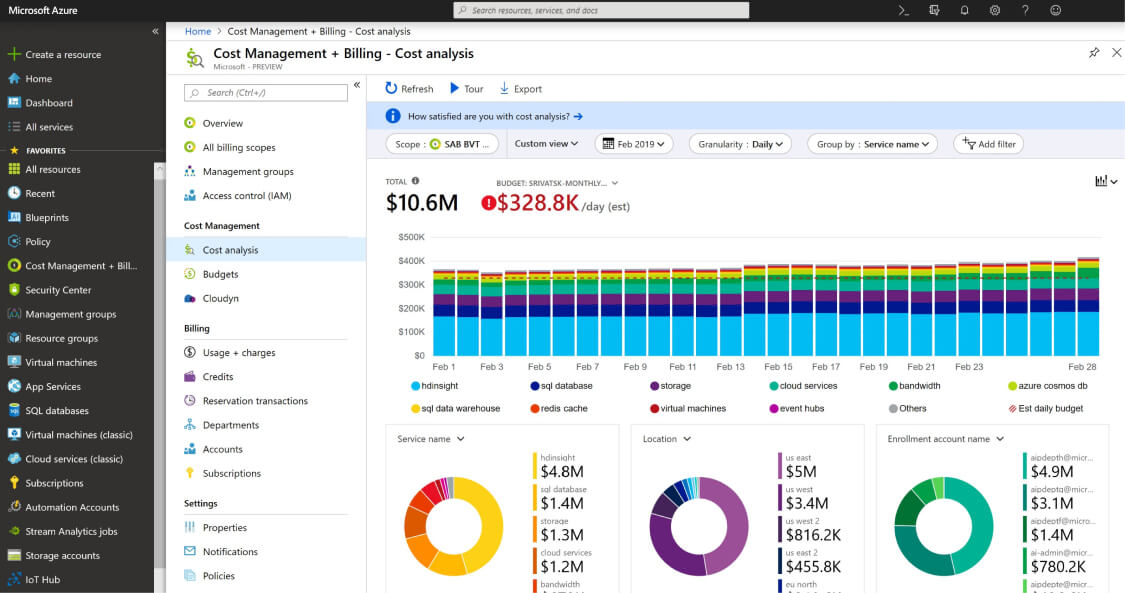
A very important aspect is knowing what we're consuming and which resources we're using it on. If we add the possibility of having spending forecasts, we can get complete information and use it to make decisions. Here's how to do it:
- Monitor and analyze your bill with Microsoft Cost Management.
- Use the Azure calculator to calculate costs for your upcoming projects or expansions.
Workload cost optimization
- Use Azure Advisor to see and analyze recommended practices to save costs.
- With different tools, you can analyze your resource workloads and optimize them. With Microsoft Azure Well-Architected Review and the Azure Well-Architected Framework design documentation, you can reach your own conclusions.
- Look for Azure offers and licensing terms, resource reservations, subscriptions, and more to achieve savings. Hybrid Advantage, prepaid predictable workloads through reservations, Azure Spot Virtual Machines, Azure Savings Plans for processes, and Azure development/test pricing are some ways to save.

Control costs
- With Microsoft Azure's cost governance and control system, we can set up alerts and spending restrictions if thresholds are exceeded.
- Azure Policy lets us control costs and set spending warning and monitoring thresholds.

8 ways to optimize costs today
Here are some tips to help identify excess spending on resources and reduce the cost of your Azure resources:
Turn off unused resources
Use Azure Advisor to identify unused resources, services using higher performance than needed, and reduce final costs.
Add a Savings Plan for dynamic workload processes
Save up to 65% off pay-as-you-go prices by committing to spend a fixed amount per hour on processing services for one or three years.
Reserve instances for steady workloads
Get up to 72% discount compared to pay-as-you-go prices on Azure services by reserving resources for one or three years.
Leverage platform Hybrid Advantage
Other cloud platforms like AWS are up to five times more expensive than Azure for Windows Server and SQL Server. You can achieve additional savings when migrating On-Premise services to the cloud or using services on-premises and in the cloud simultaneously.
Configure auto-scaling
Automatically adjust resource sizes to match current needs without over-provisioning.
Create budgets and allocate costs to teams and projects
Work with a partner to help manage costs efficiently and optimally to avoid unnecessary expenses.
As we've seen, we've provided guidelines to manage and reduce the costs that the Azure platform can generate. If you want more information about cost control or any Azure product, don't hesitate to contact us through our usual channels—we'll help you.