


In today's digital era, businesses increasingly rely on technology and online systems to conduct their operations.
As a result, meeting minimum cybersecurity hygiene standards is essential to protect against cyber threats, minimize risk, and ensure ongoing business viability.
Basic security still protects against 99% of attacks. As mentioned in the Microsoft Digital Defense Report.
The minimum standards all organizations should adopt are:
- Enable multi-factor authentication (MFA)
- Apply Zero Trust principles
- Use extended detection and response and antimalware
- Keep systems updated
- Protect data
Basic Cybersecurity Hygiene Skills
1. Enable Multi-Factor Authentication (MFA)
Want to reduce account attacks? Set up MFA. Multi-factor authentication, as its name indicates, requires two or more verification factors.
Compromising more than one authentication factor presents a significant challenge for attackers because knowing (or cracking) a password won't be enough to gain system access.
With MFA enabled, you can prevent 99.9% of account attacks.

Making MFA much, much easier
Choose MFA when additional authentication can help protect confidential data and critical systems instead of applying it to every interaction.
MFA doesn't have to be a challenge for the end user.
Use conditional access policies that enable two-step verification based on risk detections, as well as PassThrough authentication and single sign-on (SSO).
This way, end users don't have to endure multiple login sequences to access shared files or non-critical calendars on the corporate network when their devices are up to date with the latest software updates.
Users also won't have to reset their password every 90 days, which will significantly improve their experience.
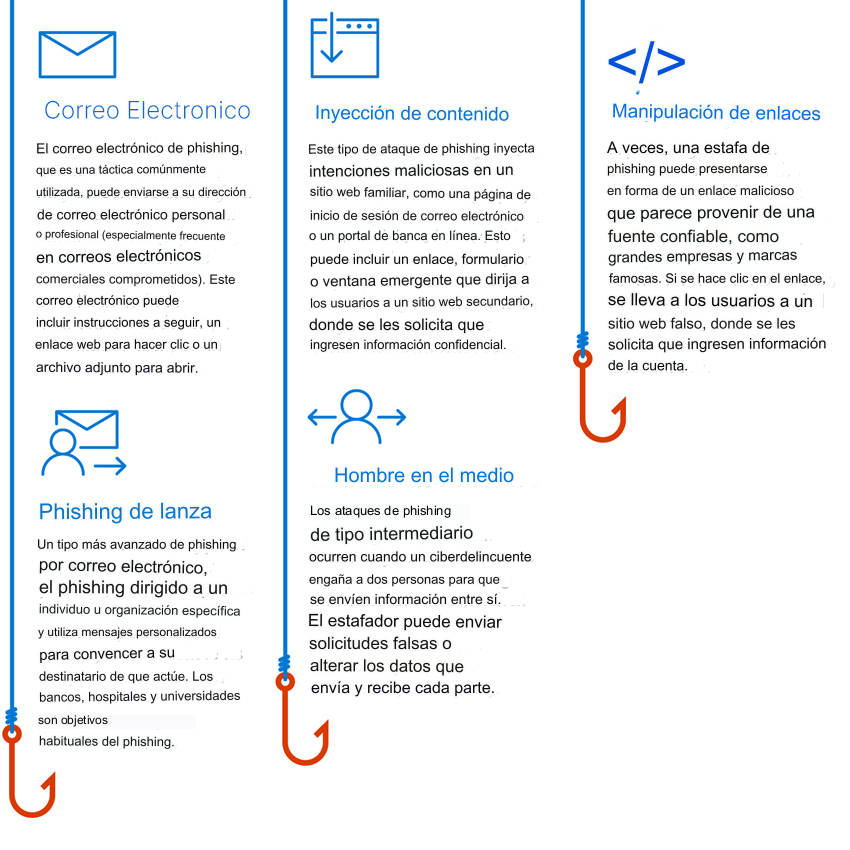
Common Phishing Attacks
In a phishing attack, criminals use social engineering tactics to trick users into providing access credentials or revealing confidential information. Common phishing attacks include:
2. Apply Zero Trust Principles
Zero Trust is the cornerstone of any resilience plan that limits impact on an organization.
A Zero Trust model is a proactive and integrated security approach across all layers of the digital estate that explicitly and continuously verifies every transaction; assumes least-privilege access; and relies on intelligence, advanced detection, and real-time threat response.
Zero Trust is a security model based on the principle of "never trust, always verify."

When adopting a Zero Trust approach, it is possible to:
- Support remote and hybrid work
- Help prevent or reduce business damage caused by a breach
- Identify and help protect business identities and confidential data
- Generate trust in your security posture and programs across your entire leadership team, employees, partners, stakeholders, and customers.
Zero Trust principles are:
- Assume breach
Assume attackers can attack and will successfully attack anything (identity, network, device, application, infrastructure, etc.) and plan accordingly.
This means constantly monitoring the environment to detect potential attacks. - Verify explicitly
Ensure users and devices are in good standing before allowing access to resources.
Protect assets from attacker control by explicitly validating that all trust and security decisions use available relevant information and telemetry. - Use least privilege access
Limit access to a potentially compromised asset with just-in-time and just-enough access (JIT/JEA) and risk-based policies, such as adaptive access control.
Only allow the privilege necessary to access a resource and nothing more.
- Assume breach
Security layers also have over-security.
Too much security (i.e., security that seems overly restrictive to the everyday user) can lead to the same result as not having enough security in the first place: more risk.
Strict security processes can make it difficult for people to do their jobs.
Worse, they can inspire people to find creative shadow IT solutions, motivating them to bypass security altogether (sometimes using their own devices, email, and storage) and using systems that (ironically) are less secure and pose greater risk to the business.

3. Use of extended detection and response and antimalware
Implement software to automatically detect and block attacks and provide insight into security operations.
Monitoring threat detection system insights is essential to respond to threats in a timely manner.

Best Practices for Security Automation and Orchestration
- Offload as much work as possible to your detectors.
Select and implement sensors that automate, correlate, and interconnect their findings before sending them to an analyst. - Automate Alert Collection.
The security operations analyst should have everything needed to classify and respond to an alert without performing any additional information gathering, such as querying systems that may or may not be offline or collecting information from additional sources like asset management systems or network devices. - Automate Alert Prioritization.
Leverage real-time analytics to prioritize events based on threat intelligence sources, asset information, and attack indicators. Analysts and incident responders should focus on the highest-severity alerts. - Automate Tasks and Processes.
Target common, repetitive, time-consuming administrative processes first and standardize response procedures. Once the response is standardized, automate the security operations analyst workflow to eliminate human intervention whenever possible so they can focus on more critical tasks. - Continuous Improvement.
Monitor key metrics and adjust your sensors and workflows to drive incremental changes.
Help Prevent, Detect, and Respond to Threats
Defend against threats across all workloads by leveraging comprehensive prevention, detection, and response capabilities with integrated extended detection and response (XDR) and security information and event management (SIEM) capabilities.

4. Stay Updated
Unpatched and outdated systems are a key reason many organizations become victims of attacks.
Ensure all systems remain up to date, including firmware, operating systems, and applications.
Best Practices
- Make devices robust by applying patches, changing default passwords, and default SSH ports.
- Reduce the attack surface by eliminating unnecessary Internet connections and open ports, restricting remote access by blocking ports, denying remote access, and using VPN services.
- Use a network detection and response (NDR) solution compatible with Internet of Things and operational technology (IoT/OT), and a security information and event management (SIEM)/security orchestration and automated response (SOAR) solution to monitor devices for anomalies or unauthorized behavior, such as communication with unknown hosts.
- Segment networks to limit an attacker's ability to move laterally and compromise assets after the initial breach. IoT devices and OT networks must be isolated from corporate IT networks using firewalls.
- Ensure ICS protocols are not directly exposed to the Internet.
- Gain deeper visibility into IoT/OT devices on your network and prioritize them based on business risk if compromised.
- Use firmware scanning tools to understand potential security weaknesses and work with vendors to identify how to mitigate risks from high-risk devices.
- Positively influence IoT/OT device security by requiring vendors to adopt secure development lifecycle best practices.
- Avoid transferring files containing system definitions through insecure channels or to non-essential personnel.
- When transferring such files is unavoidable, ensure network activity is monitored and assets are secured.
- Protect engineering workstations with EDR solution monitoring.
- Proactively conduct incident response for OT networks.
- Implement continuous monitoring with solutions like Microsoft Defender for IoT.
Also read: Microsoft 365 Security: What You Need to Know
5. Data Protection
Knowing your important data, where it is located, and whether the right systems are implemented is crucial for providing adequate protection.
Data security challenges include:
- Reducing and managing user error risk.
- Manual user classification is not practical at scale.
- Data must be protected outside the network.
- Compliance and security require a comprehensive strategy.
- Meeting increasingly strict compliance requirements.
Five Pillars of a Defense-in-Depth Approach for Data Security
Today's hybrid workspaces require data access from multiple devices, applications, and services worldwide.
With so many platforms and access points, robust protections against data theft and leakage are necessary.
For the current environment, a defense-in-depth approach offers the best protection to strengthen your data security.
This strategy has five components, all of which can be implemented in any order that suits your organization's unique needs and possible regulatory requirements.
1. Identify the Data Landscape
Before protecting your confidential data, you need to discover where it is located and how it is accessed. This requires complete visibility of your entire data estate, whether on-premises, hybrid, or multi-cloud.
2. Protect Confidential Data
In addition to creating a holistic map, you need to protect your data, both at rest and in transit. This is where accurately labeling and classifying your data comes into play, so you can gain insight into how it is accessed, stored, and shared. Accurate data tracking will help prevent it from becoming a victim of leaks and breaches.
3. Manage Risks
Even when your data is properly mapped and labeled, you need to consider the user context around the data and activities that may result in potential data security incidents, including insider threats. The best approach to addressing insider risk brings together the right people, processes, training, and tools.
4. Prevent Data Loss
Don't forget unauthorized data use: that's also loss. An effective data loss prevention solution must balance protection and productivity. It is essential to ensure appropriate access controls are in place and policies are established to help prevent actions like improperly saving, storing, or printing confidential data.
5. Govern the Data Lifecycle
As data governance evolves toward business teams becoming stewards of their own data, it is important for organizations to create a unified enterprise-wide approach. This type of proactive lifecycle management leads to better data security and helps ensure data is responsibly democratized for users, where it can generate business value.
In the digital era, security is essential. At ABD, we offer key measures, from multi-factor authentication to Zero Trust.
Don't wait to be vulnerable, act now to protect your business against cyber threats.
Your security cannot wait. Contact us and discover how we can strengthen your security without compromise.