

The combination of Copilot and Microsoft Defender provides an additional layer of security to our company, ensuring that our data is better protected and allowing us to work with peace of mind and confidence.

Having a multi-application platform like Microsoft 365 elevates our company to a higher level in terms of user productivity and efficiency.
Additionally, Microsoft 365 is not a platform that remains static, but rather progresses and advances at the same speed as the rest of the technologies.
Microsoft 365 applies Copilot to improve security
A clear example is Microsoft 365 Copilot. With Copilot, we have Artificial Intelligence (hereinafter AI) at our service to help us distance ourselves from other companies that don't use it or use it poorly.
Why not use AI to help us defend against external threats? What could AI offer us in this area?
Microsoft Copilot for Security is the answer. AI at the service of security that offers IT Administrators the Copilot experience in natural language.
Microsoft Copilot Features for Security
Fully integrated with Microsoft Defender, Copilot provides us with detailed information about the elements that cause various threats and the possible risks in our environment. It also helps us understand how those risks could affect us.
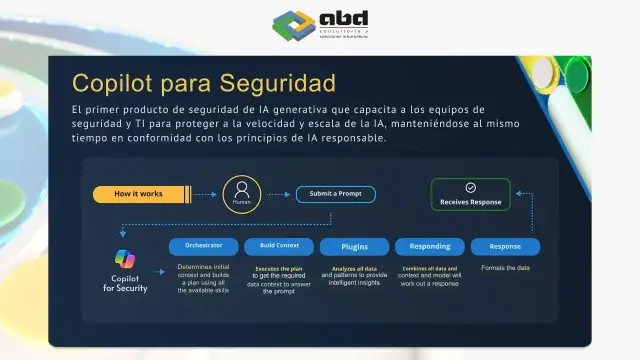
Additionally, Copilot identifies vulnerabilities and uses the information contained in Microsoft Defender to strengthen our company's security and improve threat analysis.
Recommendations for Using Copilot in Security

When it comes to using Copilot to improve our company's security, it's essential to follow some recommendations regarding the selection and execution of prompts. Here are some recommended best practices:
- Clarity in Requests: When interacting with Copilot, it is essential to be clear and specific in our requests. Providing detailed information about what we need helps Copilot understand our needs and offer relevant and useful responses.
- Use of Formal and Detailed Language: It is important to use formal language when communicating with Copilot, avoiding unnecessary jargon or ambiguous expressions. The more details we provide about our requirements and objectives, the better the response we will get from Copilot.
- Conducting Various Tests: To improve interaction with Copilot and optimize its performance, it is beneficial to conduct different tests and experiments. This allows us to evaluate how Copilot responds to different types of requests and adjust our communication accordingly to obtain the best possible results.
The Scope of Microsoft Copilot
As we see, Copilot's tentacles extend and encompass more and more tools.
A series of features that will allow us to give Copilot clear messages about what we want to get from Microsoft Defender to improve our security and make more tailored decisions to our needs.

If you're looking to improve your company's security, consider implementing Copilot. This tool can identify threats and strengthen your cyber defenses.
En ABD, we're here to assist you in implementing Copilot and other enterprise security measures.
Contact us for more information on how we can help you protect your data and ensure your team's security.