

Artificial intelligence is no longer a future promise: it is a reality that is transforming the way we interact with business management systems.
One of the most powerful and recent features within the Microsoft Dynamics 365 Business Central ecosystem is the ability of Copilot to generate intelligent summaries of key records such as customers, items, or sales orders.
https://youtu.be/1PZ-VCuCRZI?si=XZREYDI8j3bbBrLI
What does Copilot do in Business Central?
Copilot uses generative AI to display, directly in the contextual information pane, a concise summary tailored to the user’s role. This summary, presented in 2 or 3 bullet points, highlights critical and actionable information about a specific record, enabling faster understanding of the data and drawing attention to potential areas that may require review.
Key advantages
Quick visualization of relevant data without the need to navigate through multiple tabs.
Personalized context based on the user's profile.
Ability to interact with the summary to obtain more details or open related pages.
Practical example: intelligent customer summary
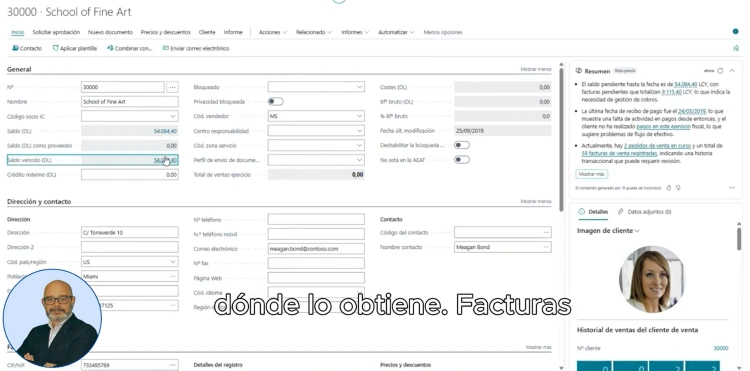
Imagine you are on the customer card inside Business Central, specifically for the customer with ID 30000. In the right-hand side panel, an automatically generated summary from Copilot appears. In this case, the summary includes information about:
The customer's outstanding balance.
Ongoing sales orders.
Invoices issued and unpaid.
By clicking on the value of the outstanding balance, the exact source of the information is displayed, such as open invoices or active orders. If you decide to explore further, you can select “Show more”, and the panel will expand with new informational bullet points and the option to interact directly with Copilot, asking additional questions about that customer.
This functionality allows users to save time, reduce errors, and always maintain a clear and actionable view of each customer or key transaction.
Why is this functionality important?
In a business environment where agility and real-time information are key to competitiveness, having tools like Copilot in Business Central not only improves the user experience but also enables users to turn data into immediate decisions.
From finance and sales to customer service, any team can benefit from this ability to understand at a glance the current status of a customer or process without wasting time navigating through menus or reports.
At ABD Consulting, we help you implement AI in your ERP.

At ABD Consulting and IT Solutions, as a Microsoft partner, we are experts in the implementation, customization, and support of Business Central. We not only help you get the system up and running, but we also guide you to make the most of features like Copilot.
Whether you are beginning your path toward digitalization or looking to optimize your current system, we provide guidance so that artificial intelligence works in favor of your business processes.
In addition, we provide hands-on training and support sessions so that your team can take advantage of every improvement without complications.
Do you want to see how Copilot can transform your day-to-day work in Business Central? Contact us.