

With the introduction of this new feature in Business Central 2025 Wave 2 (v. 27), we can hide sensitive data using an on‑screen mask, requiring the user to click an additional button to reveal it. This reduces the risk of data theft and improves information confidentiality.

How does data masking work in Business Central?
This new feature can be added to new fields developed in the client's extensions through a new "MaskType" property at the field level.
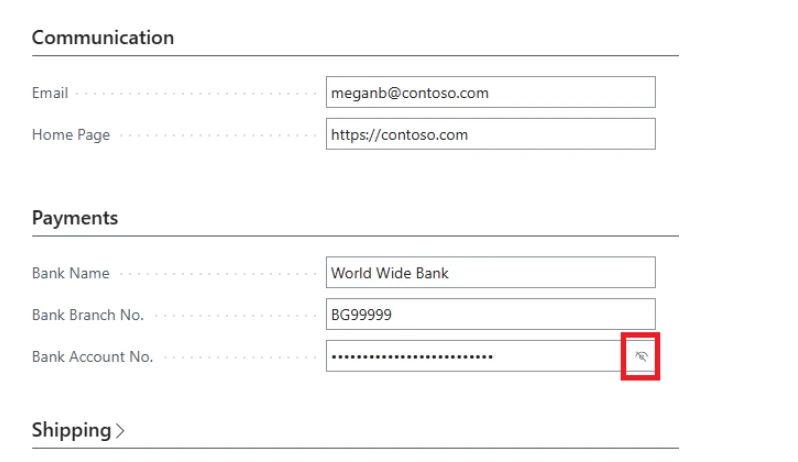
Once the field is configured with this property, it is masked by default and its content can only be viewed by clicking the “Show” button within the field itself.
It can be very useful for:
- Personal identifiers.
- Financial details.
- Confidential notes.
- Scenarios in open or shared environments.
Limitations and compatibility of MaskType in Business Central
Page types where it works
- It works on card-type pages, such as documents or cards.
- It does not work on lists or grid controls.
Compatible devices
- It works on both mobile devices and desktop computers.
Supported field types
It can be applied to fields of type:
- Code.
- Text.
- Decimal.
- Integer.
Enabling the feature in Business Central
This feature is disabled by default.
To enable it, we must go to Feature Management in Business Central and activate it:

And once enabled, it will be displayed like this:
Business value of the MaskType feature
Protecting confidential information from unauthorized viewing is essential for any organization. Thanks to data masking, Business Central reduces the risk of prying eyes (“shoulder surfing”) and significantly improves data privacy.
Extended technical details (additional information)
This feature introduces a new MaskType property at the field level that allows developers to hide values in text fields.
Business Central masks the value by default and only displays it when the “Show” button is pressed.
It is especially useful for protecting sensitive data such as:
- Personal identifiers
- Financial details
- Internal comments or notes
Additionally:
- Masking is consistent across all pages.
- It can be configured to support role-based visibility.
- It can be integrated with audit logs.
Important warning
This feature operates only at the user interface layer.
The actual unmasked data is still transferred to the browser, so it should not be considered a cryptographic protection.
MaskType enumeration
It includes the following values:
- None: no masking
- Concealed: value masked by default
MaskType cannot be used together with the ExtendedDatatype = Masked property.
Real-world use cases without repeating content
Shared work environments
Ideal for companies where multiple users work on the same screen or in exposed areas.
Financial processes
Prevents banking data, amounts, or internal codes from being visible to employees without the appropriate permissions.
Customer service operations
In departments that handle sensitive information in real time, this feature helps avoid accidental exposure.
Why is it relevant for security and regulatory compliance?
MaskType strengthens Business Central’s data‑privacy posture and supports compliance with:
- Internal information‑classification policies
- Data‑protection audit requirements
- Standards for minimizing visual exposure
- Privacy obligations in regulated industries
How ABD Consultoría helps you implement this feature

At ABD Consulting and IT Solutions we specialize in:
- Business Central implementations and upgrades.
- Development of extensions with advanced functionality.
- Security and privacy configuration in the ERP.
- Adaptations based on BC 2025 Wave 2 new features.
- Audits of permissions, roles, and data protection.
If you want to modernize your Business Central environment, contact us and we will advise you with no obligation.