

In many Dynamics 365 Business Central projects, it is common to integrate processes with Power Automate, whether for notifications, external integrations, or the automation of business workflows.
One of the most direct ways to do this is by making HTTP calls from AL to a Power Automate flow using the When an HTTP request is received trigger.
Although the approach is simple, there are some important details that can cause hard‑to‑identify errors if you are not familiar with the HTTP classes in AL.
In this article we will cover:
- How to correctly perform an HTTP POST call from AL
- Where headers must be declared
- A very common Content-Type error and how to avoid it
Sending Business Central data to Power Automate via HTTP
Scenario
We want to send information (for example, a posted invoice) from Business Central to a Power Automate flow using an HTTP POST call with a JSON‑formatted body.
The Power Automate flow expects:
- Method: POST
- Header: Content-Type = application/json
- Body: valid JSON
Structure of an HTTP call in AL
HTTP classes in Business Central
In AL, we mainly work with the following classes:
- HttpClient
- HttpRequestMessage
- HttpResponseMessage
- HttpContent
- HttpHeaders
A key point to understand is that:
- The request headers
- And the content (body) headers
👉 are not the same thing.
Common error when using Content-Type in AL
Adding Content-Type in the wrong place
A common mistake is trying to do something like this:

This causes a runtime error similar to:
The requested operation cannot be performed in this context.
Why does this happen?
Because Content-Type is a content header, not a request header.
In AL, Business Central does not allow adding content headers (Content-Type, Content-Length, etc.) directly to the headers of the HttpRequestMessage.
Correct way to define Content-Type
Using HttpContent properly
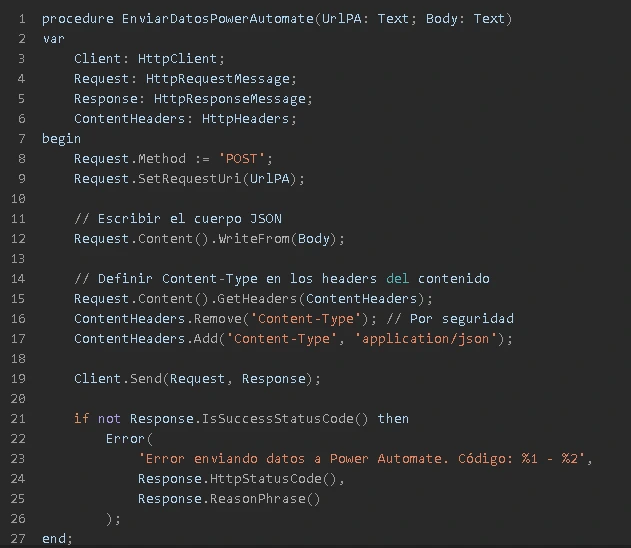
The Content-Type header must be added to the headers of the HttpContent, not to the request.
Correct example using HttpRequestMessage
Simplified HTTP sending with HttpClient.Post
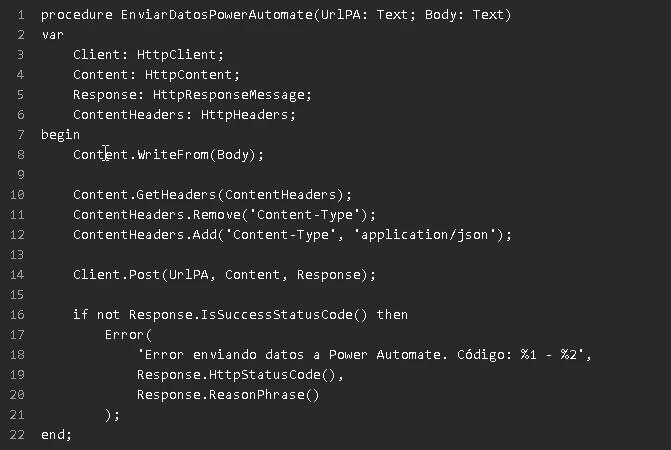
A simpler alternative for AL integrations
If you don’t need to manipulate the full request, this option is usually cleaner and easier to maintain.
Best practices for HTTP integrations with AL
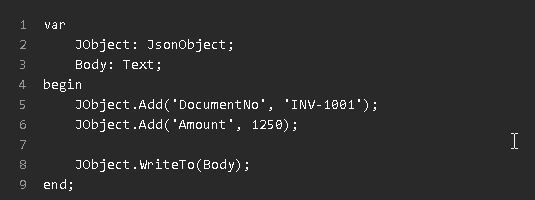
- Building JSON with JsonObject
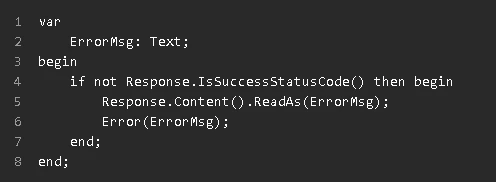
- Reading the response when errors occur
- Separate technical and functional logic: Encapsulate HTTP calls in integration codeunits, not directly in pages or actions.
Conclusion: secure integration between Business Central and Power Automate
The integration between Business Central and Power Automate via HTTP is powerful and flexible, but it requires a solid understanding of how AL handles:
- Requests
- Content
- Headers
Remembering that Content-Type belongs to the content and not the request will prevent hard‑to‑diagnose runtime errors and save a lot of development time.
ABD Consulting, specialists in Microsoft integration

At ABD Consulting and IT Solutions, we specialize in projects involving Dynamics 365 Business Central, Power Platform, and Microsoft 365, helping companies automate real processes through secure and scalable integrations.
We support our clients throughout the entire cycle: from the functional design of the process, to the technical development in AL, the creation of flows in Power Automate, and the monitoring of critical integrations.
If you need to integrate Business Central with external systems, APIs, cloud platforms, or advanced Power Automate flows, ABD can help you do it in a robust, maintainable way that aligns with Microsoft best practices.