

What New Options Does Business Central Offer in the Barcode Area?
Let's greet business innovation. In this section, we will explore the latest new features in Business Central that are transforming the way companies manage their operations.
We will focus specifically on the new «Print label on multiple pages» feature, analyzing how this tool is impacting the optimization of business processes.
Throughout this article, we will examine in detail what benefits this functionality offers and how it can help improve operational efficiency in the B2B realm.
Get ready to discover how Business Central is taking productivity to new levels.
What Areas Does the Label Printing Report Cover?
Let's dive into the different areas covered by the label printing report in Business Central.
These areas include the product card, the item list, item references, as well as the lot information card and the serial number information card.
Through this detailed exploration, we will understand how these specific areas are key in the process of optimizing business management with Business Central.
- Product Card and Item List
- The report prints Item No., Description, and GTIN as 1D and 2D barcodes.
- Item References and Item References List
- The report prints Item No., Description, Unit of Measure, and Reference No. as 1D and 2D barcodes.
- Lot No. Information Card and Lot No. Information List
- The report prints Item No., Description, and Lot No. as 1D and 2D barcodes.
- Serial No. Information Card and SN Information List
- The report prints Item No., Description, and Serial No. as 1D and 2D barcodes.
How are Barcode Labels Generated in Business Central?
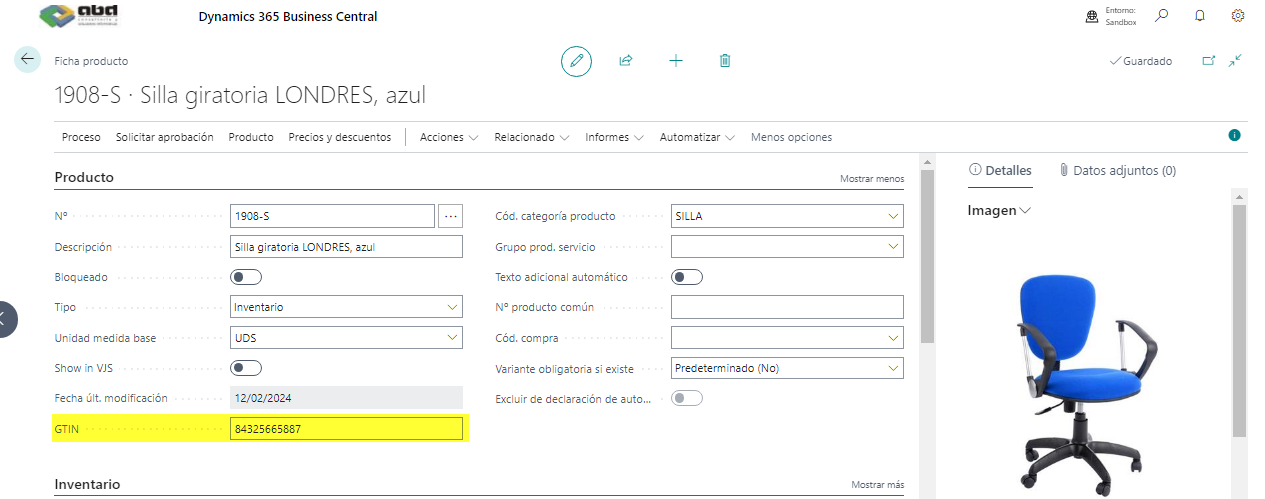
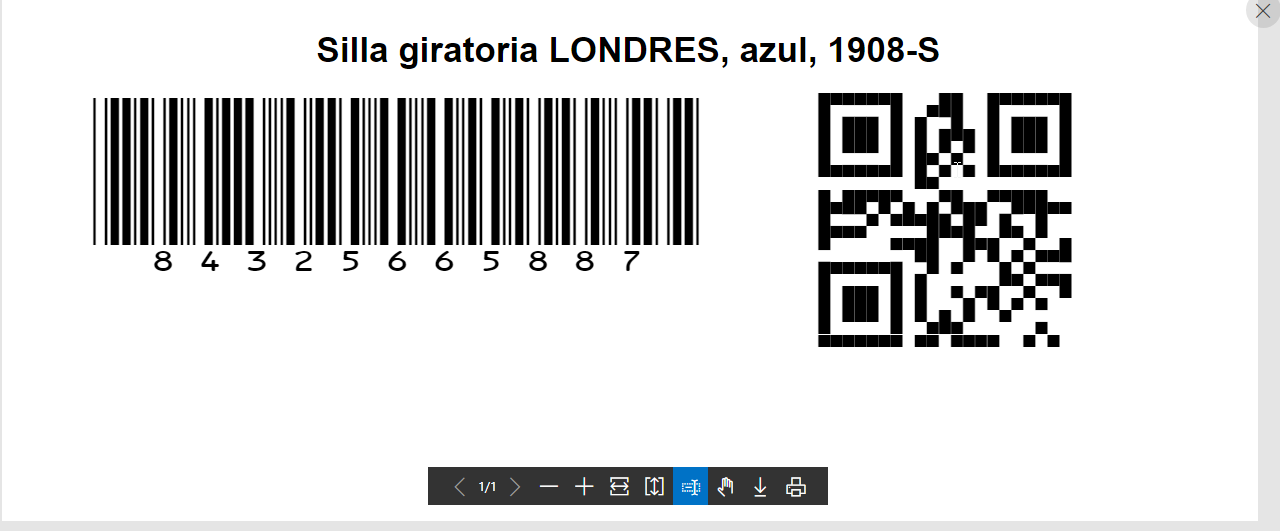
The ability to create labels in barcode format has been added. From the product card, we can complete the GTIN field, which refers to the identification for this product, generically. Let's see with images how we could generate the label from a product's card:
Generation from the Product Card in Business Central
- Process of filling in the GTIN field for product identification.
1.We fill in the GTIN field, which is the global trade item number, a unique and internationally recognized number that identifies each product.
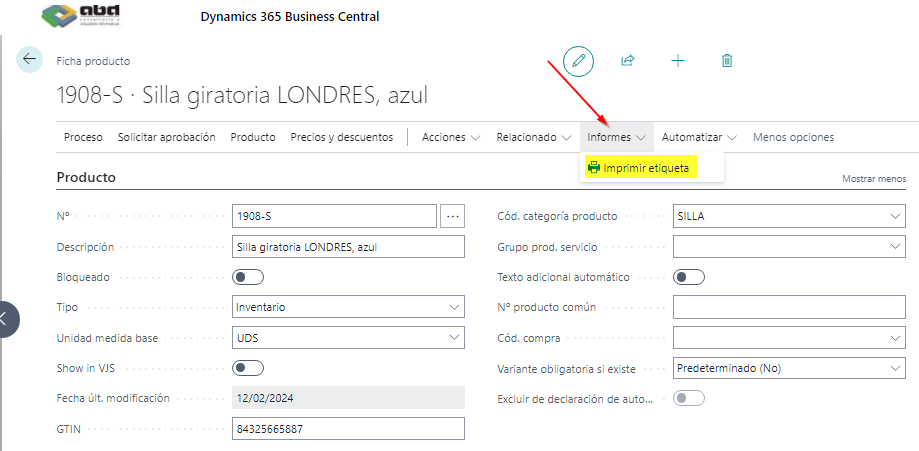
2. From the Reports button, we click "Print Label"
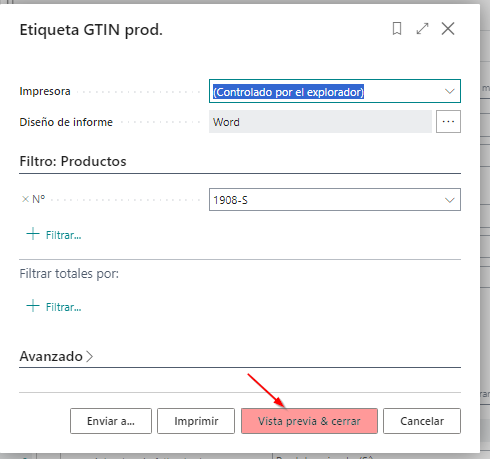
3. A label is generated for us in two formats, barcode and QR.
What Considerations are Important When Using the Label Printing Functionality?
When using the label printing functionality in Business Central, it is crucial to take into account the wide variety of printers and barcode/QR code formats available on the market.
The appropriate choice of printer and format will ensure precise and legible printing of labels, which is essential for the efficient operation of business processes.
Regarding the handling of templates and customization of the report in Business Central, it is recommended to follow some key practices.
- First, it is suggested to carefully review the available templates and select the one that best suits the specific needs of the company.
- Additionally, it is important to consider the possibility of customizing these templates according to the particular requirements of the business, which may include adding additional information or modifying existing designs.
- Finally, it is advised to perform thorough tests after any customization or modification to ensure that the final report meets the required quality and accuracy standards.
How are Barcodes Scanned on Mobile Devices within Business Central?
In Business Central, the process of scanning barcodes using the mobile device's camera is quite simple and efficient.
Users simply need to open the Business Central mobile app on their device, select the barcode scanning option, and point the device's camera at the barcode they wish to scan. Once the camera detects the barcode, it automatically captures the information and transfers it to the Business Central system for processing.
In what situations is this functionality useful?
This functionality is especially useful in a variety of business situations. For example, in warehouse or inventory environments, employees can scan barcodes on products to update inventory quickly and accurately.
Likewise, at points of sale or during goods receipt, scanning barcodes on mobile devices facilitates product identification and streamlines invoicing and inventory tracking processes.
In general, this functionality provides a convenient and agile way to manage product information and improve operational efficiency in various aspects of the company. This feature is compatible with iOS and Android platforms.
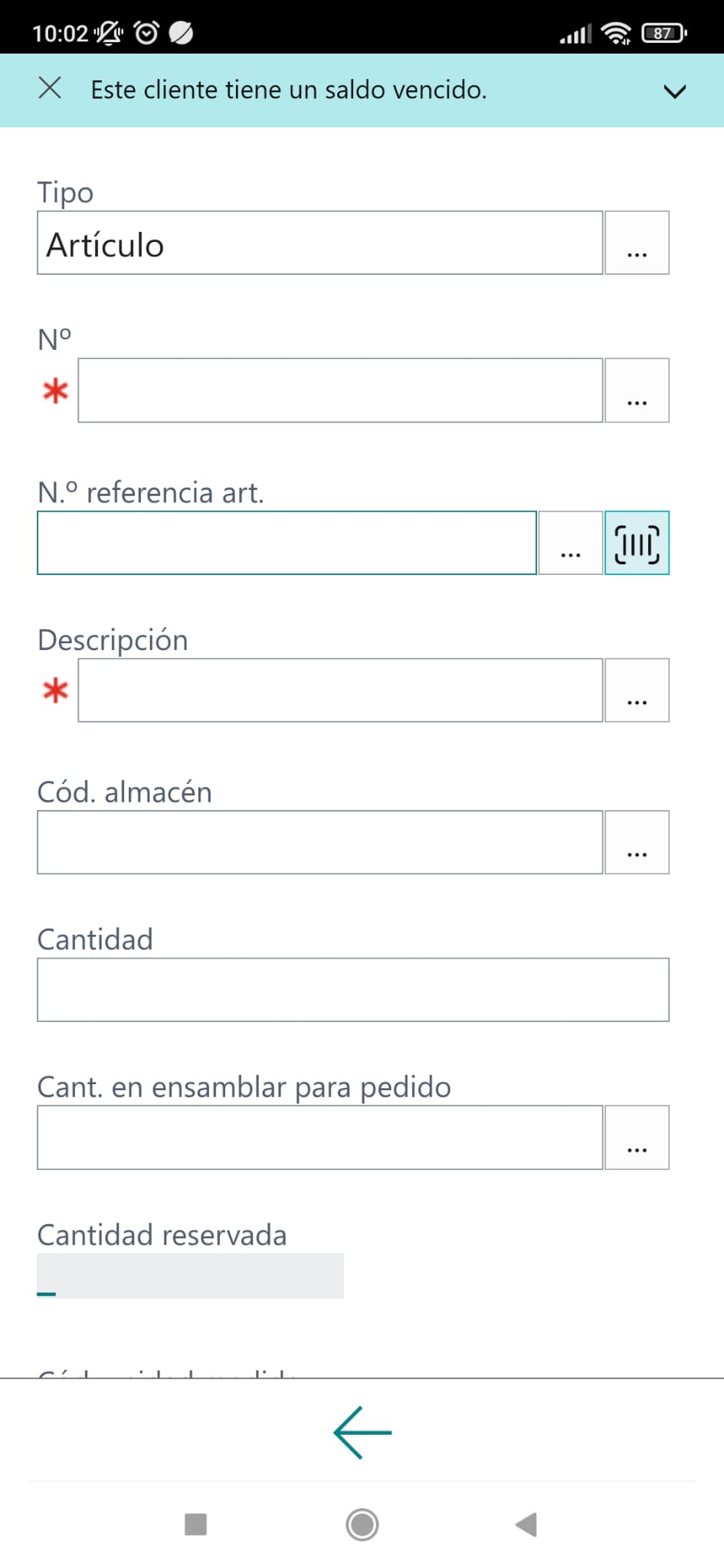
How are the Scanned Data Displayed in Business Central?
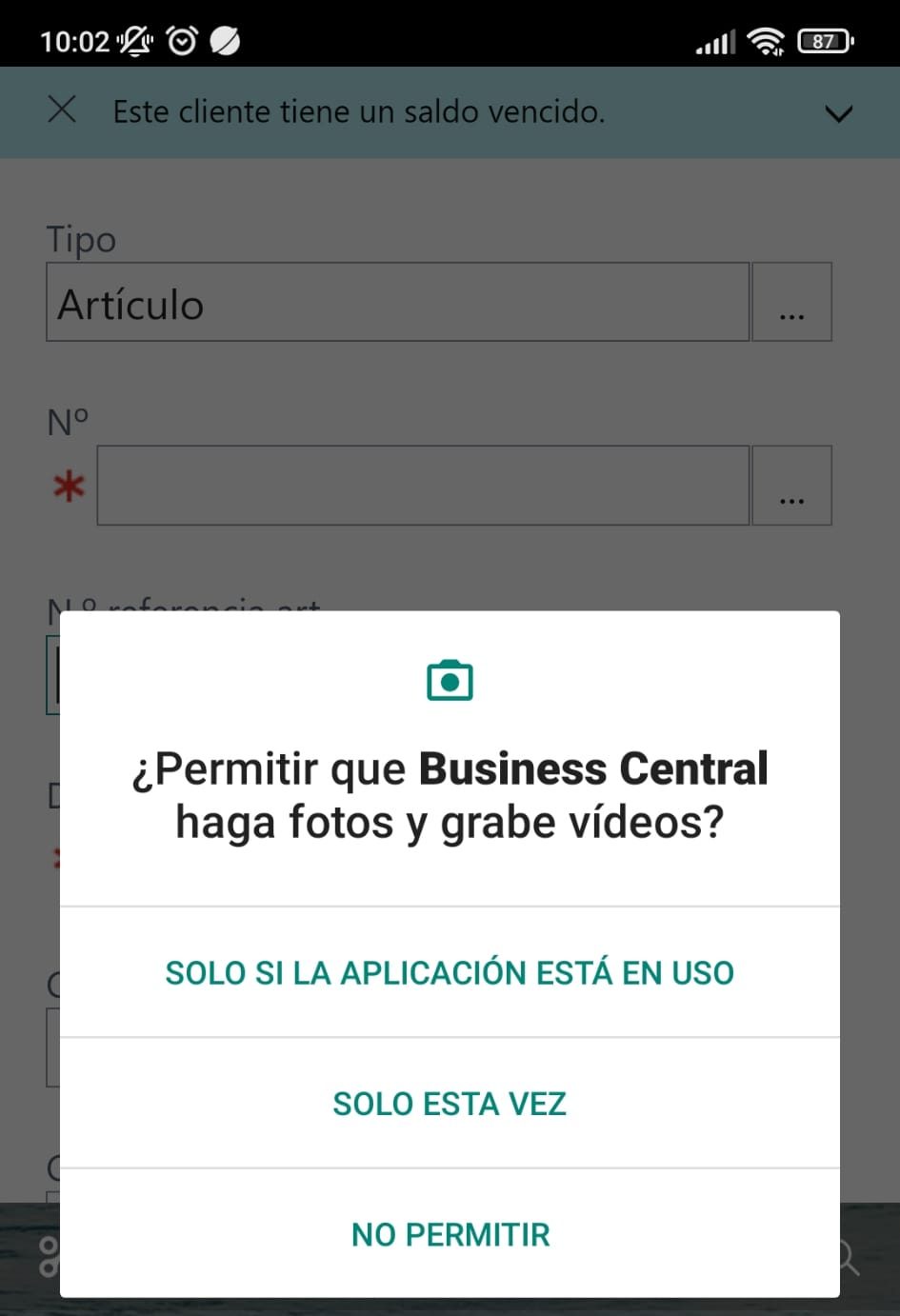
- You need to allow access to the mobile's photo camera to be able to scan codes:
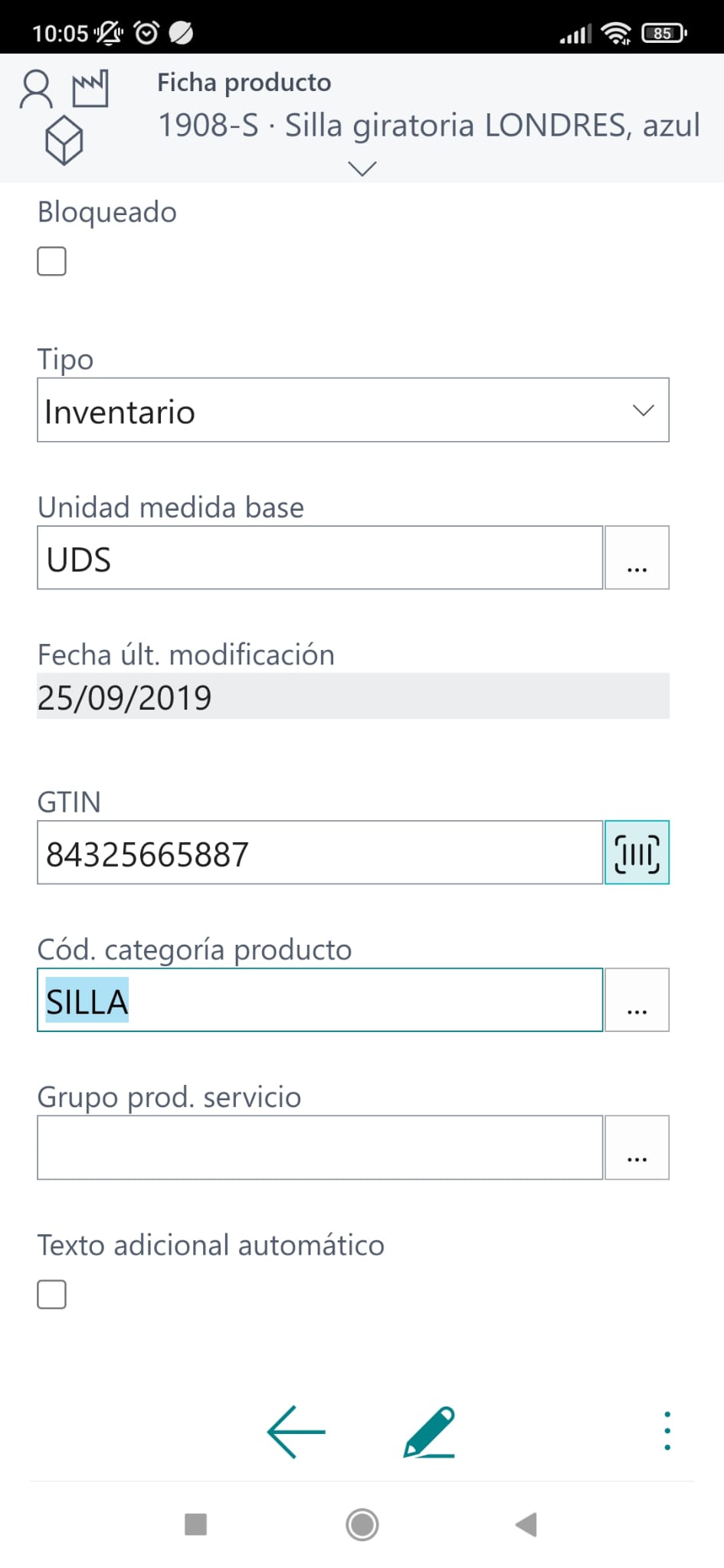
- This is how the barcode value would appear in the corresponding field once the reading has been performed:
What Tables and Pages are Relevant in Business Central for Tracking and References?
Details about the tables and pages involved in product tracking and item references in Business Central.
In Business Central, various tables and pages are fundamental for product tracking and item references, allowing users to effectively manage information related to their inventory and business operations. Some of these tools include:
Product Tracking
- Page 6510 «Product Tracking Lines»
- Serial No.
- New Serial No.
- Lot No.
- New Lot No.
- Package No.
- New Package No.
- Page 6550 «Warehouse Product Tracking Lines»
- Serial No.
- New Serial No.
- Lot No.
- New Lot No.
- Package No.
- New Package No.
- Page 6520 «Item Tracking»
- Serial No. Filter
- Lot No. Filter
- Package No. Filter
- Page 40 «Item Journal»
- Serial No.
- Lot No.
- Package No.
- Table 5767 «Warehouse Activity Line»
- Serial No.
- Lot No.
- Package No.
- Note that this table is used by the following pages:
- Page 5780 «Warehouse Pick Subform»
- Page 7378 «Warehouse Pick History Subform»
- Page 5771 «Internal Put-away Subform»
- Page 7316 «Warehouse Movement Subform»
- Page 7376 «Warehouse Inventory Movement Subform»
- Page 7383 «Inventory Movement Subform»
- Page 7326 «Warehouse Physical Inventory Journal»
- Serial No.
- Lot No.
- Package No.
Item References
- Table 5777 «Item Reference»
- Reference No.
- Table 6505 «Lot No. Information»
- Lot No.
- Table 6515 «Package No. Information»
- Package No.
- Table 6504 «Lot and Serial No. Information»
- Serial No.
- Table 83 «Item Journal Line»
- Production Reference No.
- Table 5876 «Physical Inventory Journal Line»
- Production Reference No.
- Table 39 «Purchase Line»
- Production Reference No.
- Table 37 «Sales Line»
- Production Reference No.
Others
- Table 27 «Item»
- GTIN
How can users leverage this information in their processes?
These tables and pages provide users with a wide range of tools to track their products and item references in detail, allowing them to effectively manage their inventory and optimize their business processes.
What are the Final Conclusions and Recommendations in Business Central?
In conclusion, the barcode functionality in Business Central proves to be a fundamental tool for optimizing inventory management and improving operational efficiency in companies.
The ability to print labels, scan barcodes, and track products accurately offers a significant competitive advantage in an increasingly demanding market.
To make the most of these improvements, users can take several practical actions:
- Staff Training: It is crucial to provide adequate training to employees to familiarize themselves with barcode-related functionalities in Business Central. This will ensure they can effectively use these tools in their daily work.
- System Customization: Users can explore customization options in Business Central to adapt barcode functionalities to their company's specific needs. This may include creating custom templates, configuring scanning rules, and integrating with other business systems.
- Monitoring and Continuous Improvement: It is important to establish monitoring and evaluation processes to measure the impact of implemented improvements. This will allow users to identify areas for improvement and make adjustments as needed to further optimize their operations.
In summary, by fully leveraging the barcode functionality in Business Central and following these recommendations, users can significantly improve efficiency and accuracy in managing their inventory and overall business processes.
I hope you find it helpful.
Conchi Beltrán Reyes
Dynamics Programming –
ABD Consulting and IT Solutions