


For years, the usual way of working with Power BI has been simple but far from professional: a .pbix file sent by email, uploaded to Teams, or stored in a shared folder.
And we all know how that ends:
- report_final.pbix
- report_final_v2.pbix
- report_final_now_really_final.pbix
- report_final_now_really_final_v3.pbix
This is not BI development.
This is file management.
And in 2026, Microsoft has given the definitive push to change this model.
The shift in Power BI: from PBIX files to PBIP projects
Power BI is evolving toward a much more professional model: working with structured projects instead of closed files.
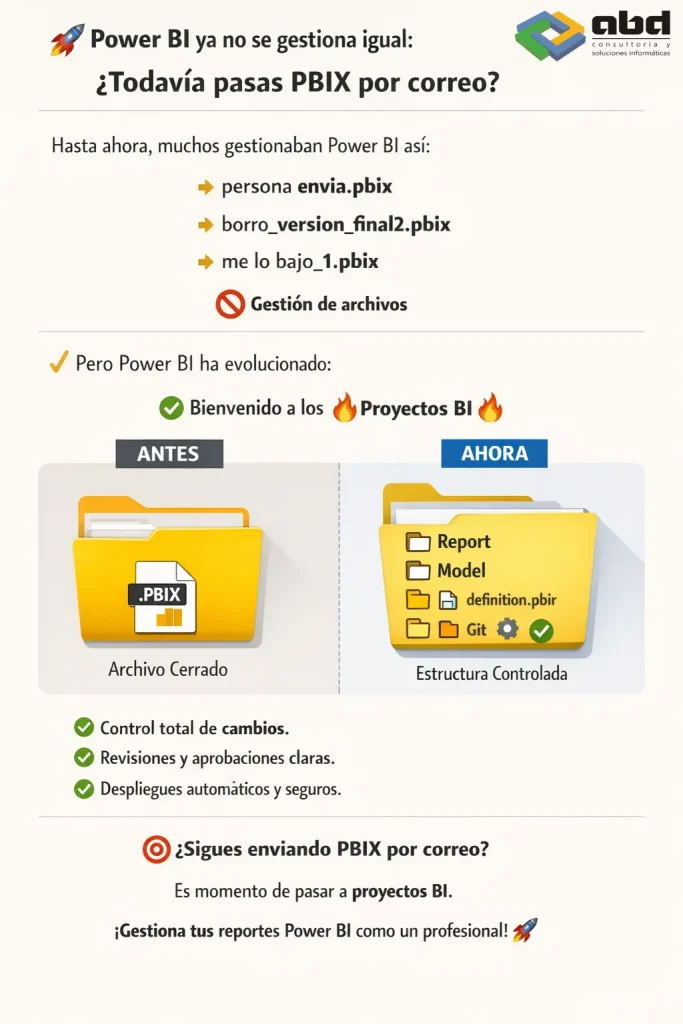
Instead of working with a single opaque file (.pbix), we now work with a project where each part of the report is organized and separated:
- Report
- Pages
- Visuals
- Data model
This enables something essential:
Real change control, traceability, and serious teamwork.
Differences between the traditional PBIX model and Power BI projects

Before: PBIX file–based model
- A single closed file
- Invisible changes
- Difficult collaboration
- Constant risk of overwriting
- Manual and fragile deployments
Now: Power BI projects with version control
- Structured project
- Visible and auditable changes
- Real teamwork
- Clear versioning
- Professional deployments
Why version control in Power BI is so important
Because Power BI no longer aims to be just a reporting tool, but rather a platform for enterprise analytical products.
And that means:
- Full change traceability
- Clear review of modifications
- Fewer production errors
- Less rework
- Greater trust in the data
In practice:
We move from “creating reports” to building maintainable analytical products.
Problems solved by the new Power BI project model
Knowing who modified a report
Who touched this report?
You can now see exactly what changed, when, and where.
Comparing changes between versions
What has changed since the last version?
No more comparing files by eye.
Changes are clear, visible, and reviewable.
Collaborative work in BI teams
How can several people work at the same time?
It stops being a problem.
Each person can work without overwriting others’ work.
Safe deployment of Power BI reports
How do we deploy changes safely?
A professional workflow becomes possible:
Development → Testing → Production
With control, validations, and clean deployments.
From Power BI reports to enterprise analytical products

This shift brings with it an important cultural transformation:
| Before | Now |
|---|---|
| Loose reports | Analytical products |
| Individual work | Collaborative work |
| Manual changes | Controlled changes |
| Fragile deployments | Professional deployments |
Risks of continuing to work with PBIX files
If your company is still sending PBIX files by email, you are paying a hidden tax in the form of:
- errors
- rework
- duplicate versions
- delayed decisions
- loss of trust in the data
This is not a technical problem.
It is a work‑model problem.
The future of BI development with Power BI
Power BI has matured.
The question is no longer: Are we building reports?
But rather: Are we building reliable, traceable, and scalable analytical products?
The transition from PBIX files to Power BI projects with version control marks a turning point in professional BI development.
ABD, your partner in Business Intelligence

At ABD Consulting and IT Solutions, we have spent more than 35 years helping companies harness the power of technology to improve their decision‑making. Our team of specialists in data analytics and Business Intelligence solutions supports organizations in implementing advanced platforms based on Microsoft Power BI, designing scalable, secure analytical models that are ready for collaborative work.
We support our clients throughout the entire process: from the implementation of Power BI, data governance, and report automation, to the adoption of professional BI development models with version control and structured deployments. The goal is clear: to transform reports into reliable analytical products that generate real business value.
If you want to evolve your data platform and take full advantage of everything Power BI offers, our team can help you.