

Microsoft has recently announced the general availability of Copilot Cowork worldwide, marking a new step in the evolution of artificial intelligence applied to the business environment. After several months in the Frontier phase, where it was adopted by more than half of the Fortune 500 companies and various organizations, this new capability is now available to customers of Microsoft 365 Copilot.
Artificial intelligence is evolving quickly within the Microsoft ecosystem. Until now, Microsoft 365 Copilot had established itself as an assistant capable of helping you write documents, analyze data, or summarize meetings, and now Microsoft is taking a step further with Copilot Cowork.
This new feature is designed to carry out complex tasks from start to finish, using multiple tools, information sources, and AI models. Unlike traditional assistants, it doesn't just provide recommendations or drafts, but can complete entire processes on its own.
But, what exactly is Copilot Cowork? What can it do for a company? How does its cost model work? And how is it different from other AI agents?
In this article, we explain everything you need to know.
What is Copilot Cowork?
Copilot Cowork It's a new Microsoft experience that lets you delegate entire processes to an AI agent.
Unlike traditional assistants, which answer questions or generate drafts, Cowork can carry out long, multi-step tasks on its own.
In other words, you set the goal and the agent takes care of doing the work.
For example:
- Analyze thousands of documents.
- Compare product versions.
- Review sales funnels.
- Prepare complex reports.
- Managing processes that require checking different business applications.
The result isn't just a simple recommendation, but a finished piece ready to review.
What makes Copilot Cowork different from other AI agents?
Microsoft has designed Copilot Cowork thinking specifically about business environments.
Cloud infrastructure and continuous execution
The tasks run on Microsoft's cloud.
This means that:
- They don't depend on the user's equipment.
- They keep working even when the computer is turned off.
- They maintain corporate safety standards.
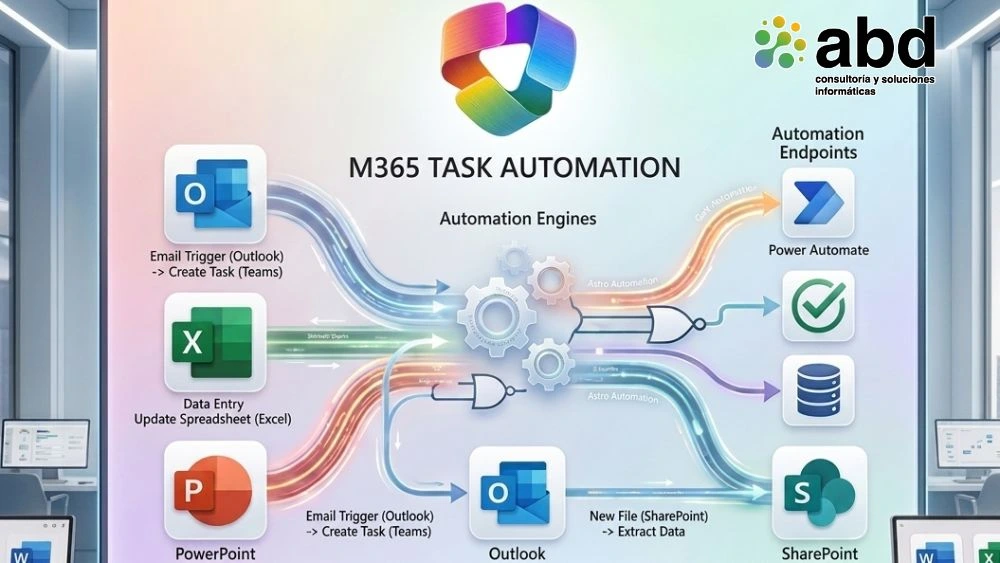
Native integration with Microsoft 365
One of the biggest advantages is its direct connection to:
- Outlook
- Teams
- SharePoint
- OneDrive
- Word
- Excel
- PowerPoint
- Dynamics 365
- Microsoft Fabric
The agent can access the actual business context to carry out much more precise tasks.
Security and regulatory compliance
Microsoft has integrated Copilot Cowork within the security perimeter of Microsoft 365.
This allows you to maintain:
- Audit of activities.
- eDiscovery.
- Confidentiality labels.
- Data lifecycle management.
- Protection against internal risks.
For organizations that handle sensitive information, this aspect can be important decisive.
Use of multiple AI models
Another important difference is its multimodel architecture.
Copilot Cowork can use different models depending on the complexity of the task.
It currently includes:
- Anthropic Opus
- Anthropic Sonnet
- GPT
- The future Cowork 1 model developed by Microsoft
The goal is to use the most efficient model for each process and optimize costs.
Real-life cases of using Copilot Cowork
Microsoft has shared several real examples obtained during the Frontier program.
Engineering process automation
A team managed to automate the safe editing of massive spreadsheets and generate automatically flowcharts after each modification.
A task that previously required constant manual supervision.
Comparison of thousands of files
Another case allowed us to analyze around 4,000 files between different versions of a product.
A job that would have taken weeks of manual review.
Sales optimization
A sales manager used Cowork to analyze a blocked pipeline.
The agent identified at-risk opportunities, prioritized actions, and came up with specific recommendations for each client.
The result was cutting several days of analysis down to just one morning of work.
How Copilot Cowork can help a company
Automation of administrative tasks
Organizations can delegate:
- Report preparation.
- Document analysis.
- Contract review.
- Information consolidation.
Improved productivity
The employees dedicate less time to spend less time gathering information and more time on strategic activities.
Better decision making
By integrating information from multiple systems, those in charge have more analysis available complete and up-to-date.
Scalability
The agent can process large volumes of information without needing to increase human resources.
How much does Copilot Cowork cost?
One of the most innovative aspects is its billing model.
While Microsoft 365 Copilot works through a fixed per-user license, Copilot Cowork uses a pay-as-you-go system.
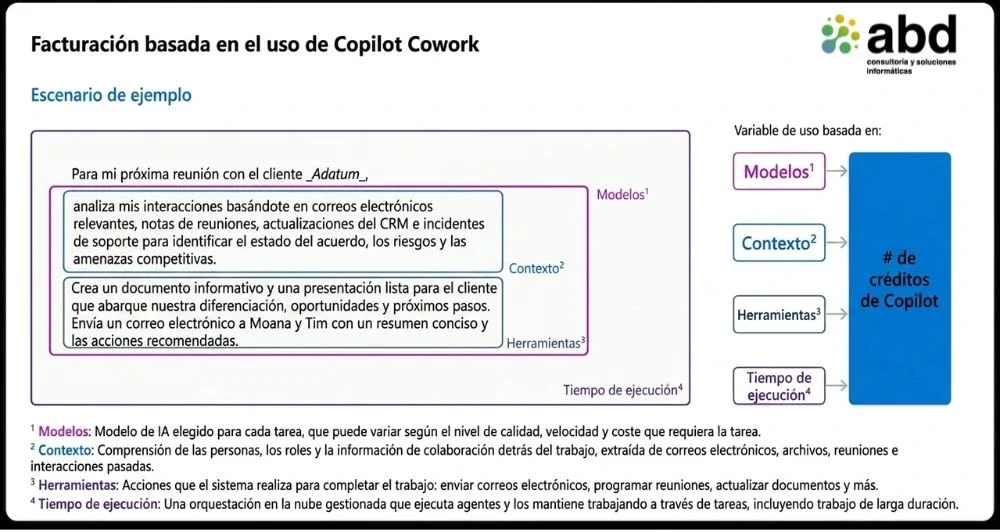
The cost depends on:
- Use of the AI model.
- Context recovery.
- Tools used.
- Runtime.
Microsoft uses Copilot credits to calculate usage.
Types of tasks and expected consumption
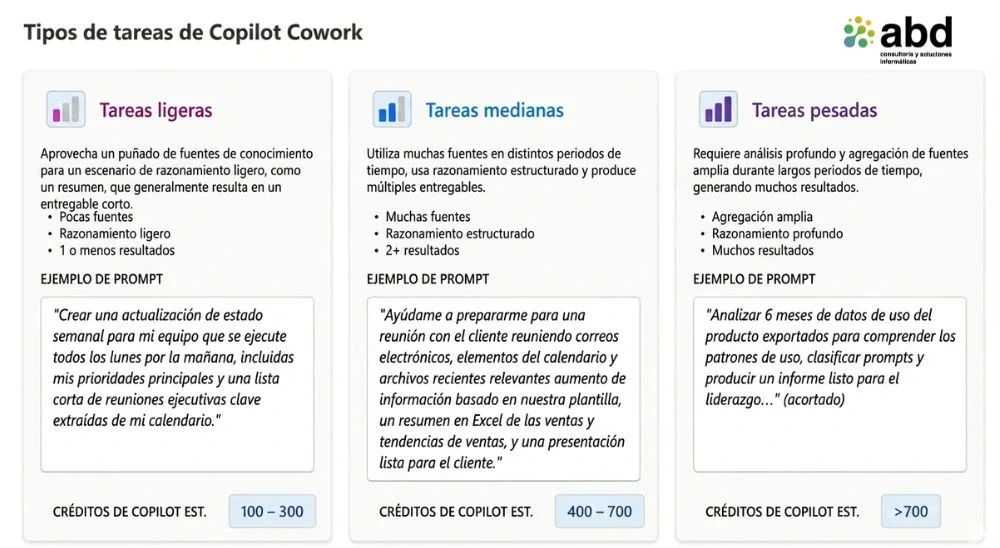
Microsoft classifies tasks into three categories:
Light chores
- Few sources of information.
- Limited reasoning.
- Simple results.
Medium tasks
- Several data sources.
- Structured processing.
- Multiple deliverables.
Heavy chores
- Large volumes of information.
- Advanced reasoning.
- Long-lasting complex processes.
This classification helps companies estimate budgets and return on investment.
Cost management: a priority for companies
Microsoft has added new features specifically to manage spending.
Control
Admins can:
- Turn Cowork on or off.
- Define who can use it.
- Set consumption limits.
- Set up budgets.
Visibility
The platform offers detailed reports on:
- Use by user.
- Consumption by department.
- Cost per task.
Efficiency
Organizations can choose different AI models depending on the desired balance between cost and performance.
The future of AI agents in Microsoft 365
The appearance of Copilot Cowork it reflects a clear trend in the market: moving from conversational assistants to agents capable of carrying out complete processes.
In the coming years, we will see how these tools take on more and more operational tasks related to:
- Finance.
- Human resources.
- Customer service.
- Operations.
- Sales.
- Document management.
Companies that start exploring these capabilities now will be better prepared to take advantage of the next generation of business AI.
How ABD Consultoría can help you
At ABD Consulting and IT Solutions We help organizations adopt Microsoft 365 Copilot and the new AI capabilities in a safe, controlled, and business-oriented way.
Our team can help you with:
- Evaluate the potential of Copilot Cowork in your organization.
- Define use cases with a return on investment.
- Design government and security policies.
- Control costs and consumption.
- Integrate AI agents with Microsoft 365, Dynamics 365, and other business platforms.
- Train users to speed up adoption.
Artificial intelligence is no longer just about generating content. Today, it's possible to automate entire processes and get tangible results. The key is doing it with the right strategy.
Do you want to find out how to apply Copilot Cowork in your company? Contact our team and we'll help you identify the opportunities with the biggest impact for your organization.