

Surely, on many occasions, we have needed to send a message but the current moment was not appropriate. Either delay it to send it when a colleague returns from vacation.
Covering these needs is simple with Microsoft Teams as it allows us the possibility of sending scheduled messages and setting a date and time to send them. Something that, depending on the circumstances, can be very useful.
Constant Evolution of Microsoft Teams as a Central Tool
Microsoft Teams is a tool in constant evolution. There are numerous improvements and new features that enhance the tool to provide all the functionalities that users and companies may need.
Microsoft has focused on Teams and has defined it as one of its core tools for daily user work, with ambitions for it to become the user's central work hub.
Scheduled Messages with Teams: A Long-Awaited Function Now Reality
With all these premises, we arrive at the utility that concerns us in this article. A function that, for a long time, was requested by many users and that relatively recently materialized in the tool.
Microsoft Teams incorporates a system to send scheduled messages and in this article we will see how easy it is to use it.
How to Send Scheduled Messages with Microsoft Teams
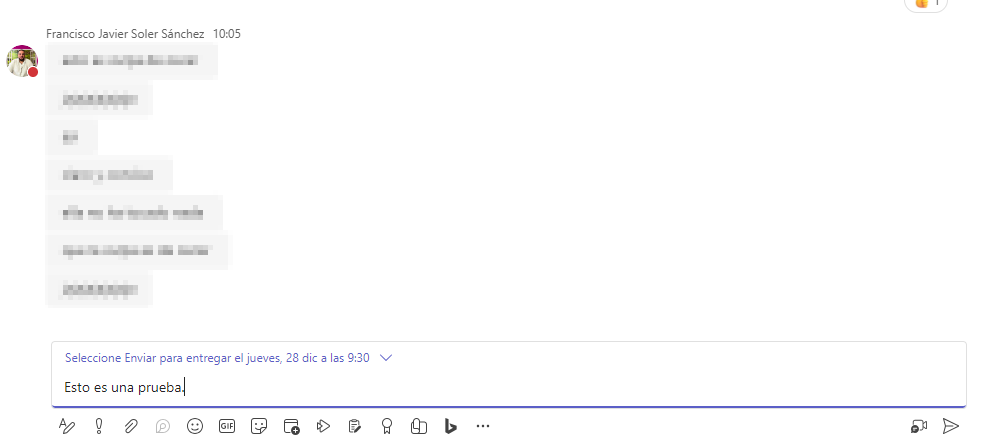
To do this, we don't go to a chat with any user. We simply right-click on the message send icon and a contextual menu will appear with the options to schedule the message sending.

Once scheduled, the message will appear with the established schedule.
Flexibility and Control: Changes and Cancellations
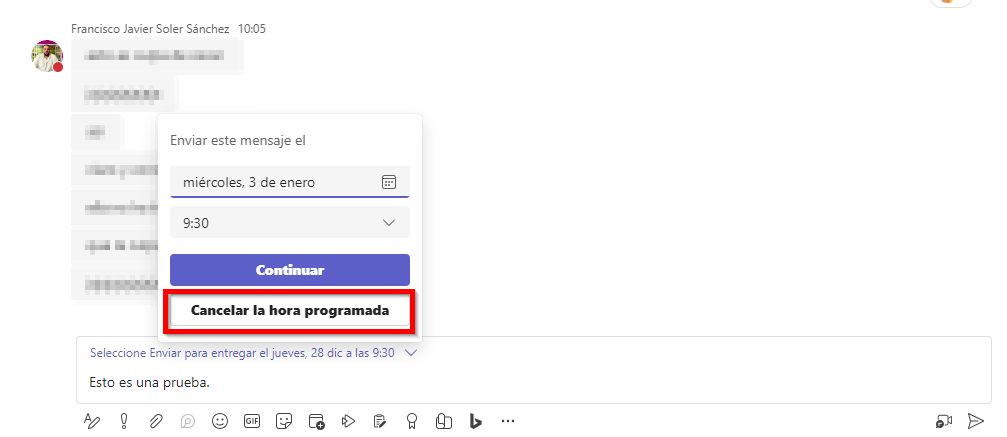
If we look at the scheduling line, a small arrow appears, which will allow us, if we click on it, to change the scheduled sending to another date or time that we consider appropriate.
Other Hidden Features of Microsoft Teams
We also have the ability to cancel sending a message if we consider that the need to send it has expired.
We see that the utility of scheduling message sending in Teams can really be useful if we need to send a scheduled message at another time or date.
Importance of Exploring Less Obvious Functions to Maximize Microsoft Teams
Discovering the hidden features of Microsoft Teams is just the beginning. At ABD, we are experts in Microsoft 365 and all its productivity tools.
If you're looking to boost your productivity and simplify your daily work, don't hesitate to contact us. We're here to provide you with detailed information, answer your questions, and guide you in optimizing your experience with Microsoft 365.
Let's make your work more efficient and productive together!