

CAMT.053 in Business Central: importing an XML doesn’t mean implementing a bank reconciliation
In treasury projects, changing the bank statement format might seem like a purely technical decision. It's not. The format determines what information the ERP receives, how it can identify transactions, and how much manual work the finance team will continue to handle.
CAMT.053, based on ISO 20022, provides an XML structure with balances, debits and credits, dates, bank references, payer and beneficiary details, SEPA information, and End-to-End references. Compared to older formats like Norma 43 or MT940, it offers a richer information base for automate the reconciliation in Microsoft Dynamics 365 Business Central.
But it's best to avoid jumping to conclusions: having more information doesn't guarantee an automatic reconciliation. The result depends on the setup, the quality of the file received, and the consistency between the banking process and the transactions recorded in Business Central.
Advisory principle
The goal shouldn't be 'just getting the file imported,' but rather designing a repeatable, traceable process with a sustainable level of automation.
1. Bank account setup
The first check is the match between the actual account and the Business Central bank account. Each bank account must be set up in a way individual and contain, at a minimum:
- Internal code and descriptive name.
- IBAN exactly matching the one reported in the CAMT.053.
- SWIFT code or BIC of the entity.
- Currency code, when the account does not operate in the local currency.
- Posting group of bank and associated account.
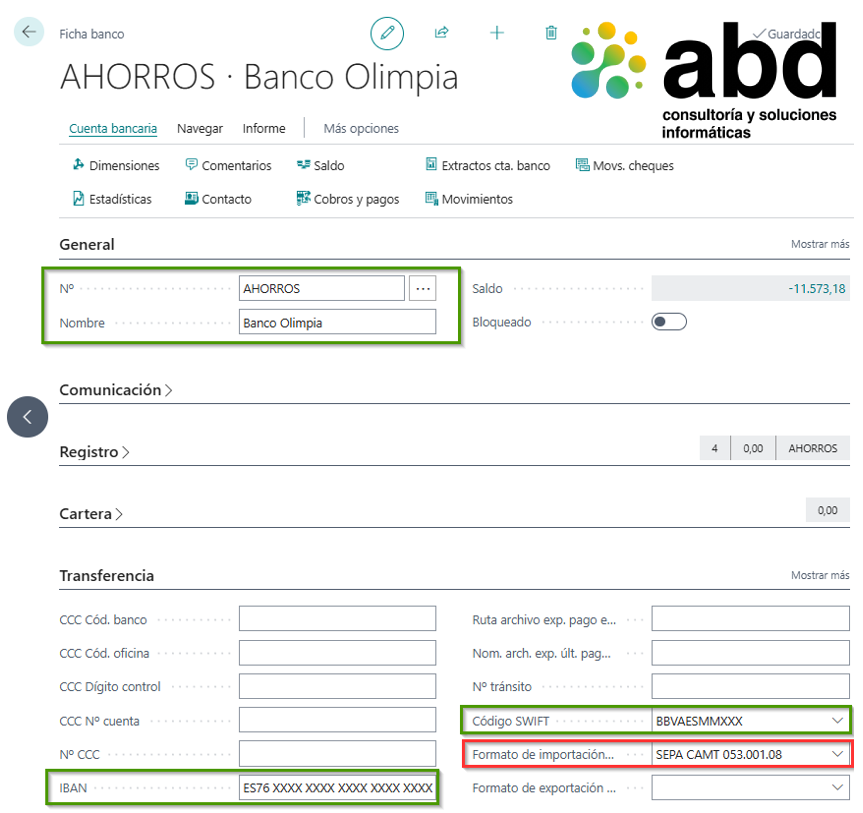
A difference in the IBAN, an incorrect currency, or a wrongly linked accounting account can turn a technically valid import into a functional problem. In multi-bank or international environments, I recommend using a consistent coding system, for example bank, country, and currency, and keeping one Business Central bank account for each real bank account.
2. Import format and data exchange definition
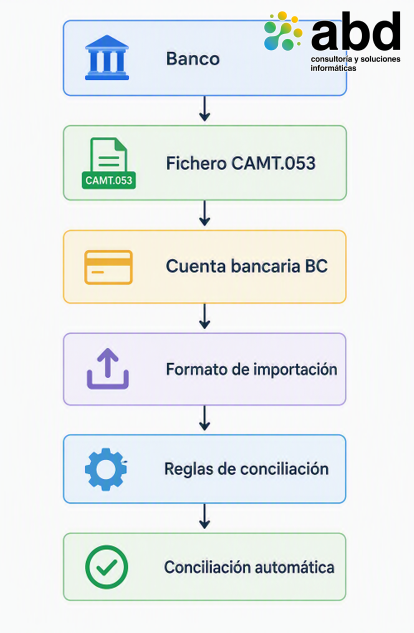
Business Central needs to know how to interpret the XML. For that, the bank import setup it must be associated with a data exchange definition capable of reading the structure of the CAMT.053 and converting its nodes into statement lines.
It's not enough to just check that the file has an XML extension. You need to validate which version or variant the bank provides and what information is actually mapped. At a minimum, it's a good idea to check:
- Operation date and value date.
- Amount and meaning of the transaction, debit or credit.
- Bank reference and transaction reference.
- End-to-End ID.
- Details of the sender and the recipient.
- Remittance text or expanded concept.
- Starting balance and ending balance on the statement.
This review should be done with actual files from each entity. Two banks might provide CAMT.053 files and still use different structures, versions, or levels of detail. Analyzing the real file avoids creating rules for fields that the bank doesn’t report or that come in different nodes.
3. Comparison engine and reconciliation rules
Once the lines are imported, Business Central compares the statement with the internal transactions. The identification can be supported by amount, date, document number, reference, and End-to-End ID. The more consistent those references are from the source, the greater the capacity for automatic reconciliation.
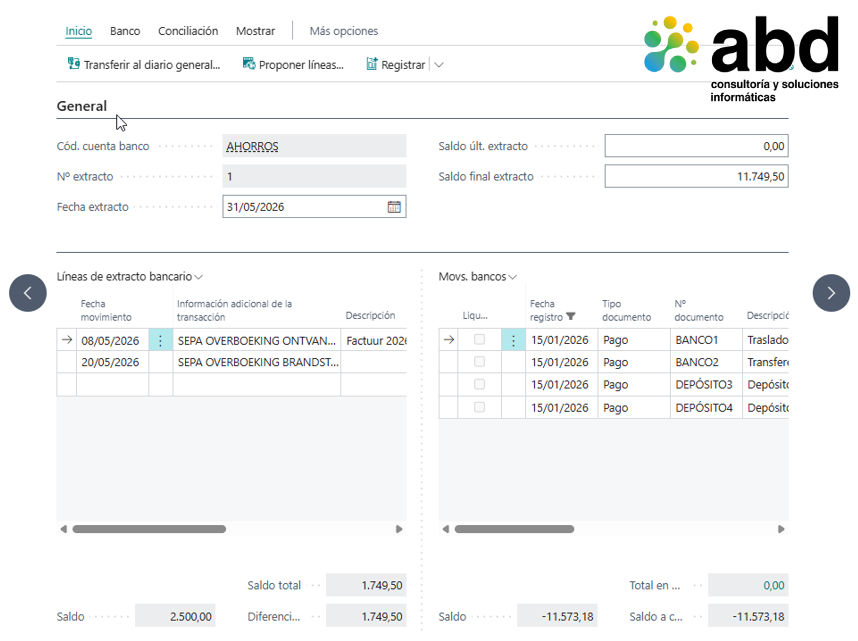
Payment settlement rules allow you to define how the text and amounts on the statement are matched with invoices, credit notes, and pending transactions of customers or suppliers. Also, repetitive transactions, like commissions or interest, should be designed with clear criteria to avoid recurring manual postings.
Operational examples
“MONTHLY COMMISSION” It can be posted to a bank expense account. “CREDIT INTEREST” can be linked to a financial income account. The rules should be tested with real variations of bank statements.
Automation improves especially when payments are generated from the Payment Journal or from the Payment Proposal in Business Central, because the ERP references can travel to the bank and later come back in the CAMT.053.
4. References: the real fuel of automation
The End-to-End ID It's one of the most valuable pieces of data in the standard. It allows you to keep a reference throughout the payment chain. However, the document number, payment reference, and remittance text should also be checked.
From a functional point of view, it's not enough to just set up the statement recipient. You also need to check how payments, collections, and remittances are generated. If the information comes out incomplete or inconsistent from Business Central, the bank file won't be able to give a useful reference for reconciliation.
Design criterion
Automatic reconciliation is designed end-to-end: document, payment proposal, bank transfer, execution, statement, and identification of the return transaction.
5. The critical point: CAMT.053 multi-account
ISO 20022 it allows a single CAMT.053 to contain multiple statement blocks, each corresponding to a bank account. However, Business Central's standard reconciliation model works with one bank account and one statement per reconciliation.
If this difference isn't analyzed during the design, import errors, partial loading, manual XML splitting, duplicates, omissions, and incorrect assignments can appear. Also, you lose traceability regarding the original file received from the bank.
My practical recommendation is to always request a separate CAMT.053 file per bank account whenever possible. It's the alternative to less complexity, less risk, and less maintenance.
When the bank only provides a consolidated file, an extension or preprocessor should be considered that:
- Read the full XML.
- Identify each excerpt node.
- Get the associated IBAN.
- Locate the corresponding bank account in Business Central.
- Generate an independent reconciliation for each account.
- Load each transaction into the correct reconciliation while keeping the traceability of the original file.
Validation in sandbox before production
Before going into production, the design should be tested with a representative set of cases:
- Customer collections correctly referenced.
- Payments to suppliers generated from Business Central.
- Fees and interest.
- Key Differences by date or by amount.
- Existing movements in the bank but not counted yet.
- Incomplete references or unidentifiable.
- Files with an account and, if applicable, multi-account files.
They also need to validate the starting balance, ending balance, statement number, the absence of duplicates, and how exceptions are handled. The goal isn't to prove that an ideal case works, but to find out what percentage of the process can be automated and what controls the user will need to handle the rest.
7. Business vision and scope control
The implementation of CAMT.053 It can reduce the time spent searching for transactions, interpreting concepts, and correcting wrong reconciliations. It also improves traceability and makes a more consistent banking strategy easier in multi-bank or international environments.
But the return depends on making decisions in the right order: first standardize the process, then set up the standard, next validate with real data, and only finally consider customization when there's a proven limitation.
As a senior Business Central consultant, my responsibility isn't to recommend more development, but protect the process, the budget, and the ERP's capacity to evolve. A good solution is one that meets the operational need with the lowest sustainable level of complexity.
Conclusion
CAMT.053 It shouldn't be treated as a new import file. It should be approached as a treasury automation project, with master data, bank integration, rules, exceptions, testing, and clearly defined architecture decisions.
Is your organization using CAMT.053 to redesign bank reconciliation or just swapping one format for another? Get in touch with ABD to expand your productivity.
ABD, specialists in Business Central and treasury automation
At ABD Consulting and IT Solutions We help companies optimize their management processes through solutions based on Business Central. Microsoft Dynamics 365 Business Central. We have extensive experience in treasury projects, bank integration, reconciliation automation, and improving administrative processes.
We accompany our clients in all phases of the project, from analysis and setup to training and support, ensuring an implementation aligned with business goals and ready to grow with the organization.
If you're considering optimizing bank reconciliation or making the most of Business Central's capabilities, our team can help you to design an efficient, scalable, and sustainable solution for the long term.